Templates · Onboarding screens · Social app · Glade
Glade Interests screen
An onboarding screen from Glade, a photo and clip social network app template in a Glass style. Screen 4 of 25.
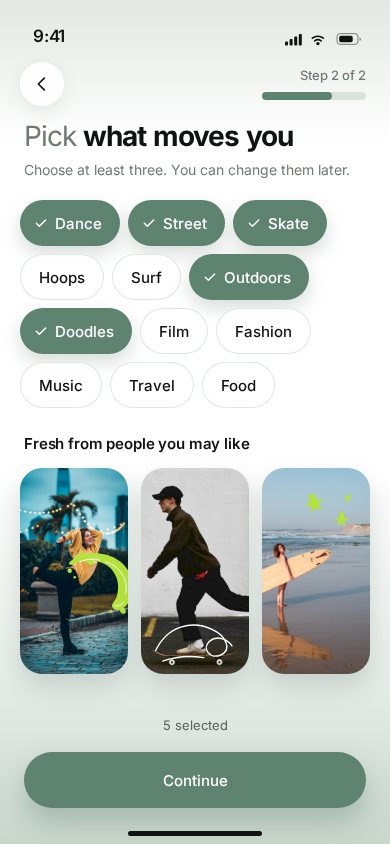
Glade is a complete photo and clip social app: a welcome photo grid, sign in, interests, a home with a story row and a photo feed, stories, posts and comments, a full-screen clip viewer with a frosted action rail, sounds, explore and search, creating a post with drawn-on doodles, activity, messages and chat, profiles, insights, saved collections, a Plus plan and settings. White into sage green with frosted glass, forest green buttons and lime doodle splashes.
| Detail | Value |
|---|---|
| Screen type | Onboarding |
| App | Glade: Photo and clip social network |
| Category | Social |
| Design language | Glass, light |
| Type | Inter |
| Colours | #ffffff background, #eef3ee surface, #101311 text, #6f7a73 text-muted, #5e8370 accent, #ffffff accent-contrast, #b4e33d secondary, #dfe7e1 border, #d9584a danger |
What this screen says
- Step 2 of 2
- Pick what moves you
- Choose at least three. You can change them later.
- Dance Street Skate Hoops Surf Outdoors Doodles Film Fashion Music Travel Food
- Fresh from people you may like
- 5 selected
- Continue
Around it in Glade
More onboarding screens
- Stoop Welcome: Neighbourhood noticeboard
- Aura Welcome: Moods with close friends
- Kindly Welcome: Volunteering near you
- Cohort Welcome: Alumni and mentor network
- Kin Welcome: Private family circle
- Confetti Welcome: Party invites and RSVPs
- Ripple Welcome: Voice notes social
- Duo Welcome: An app for two
- Soapbox Welcome: Weekly debates and polls
- Ballot Welcome: Settle it on paper
- Murmur Welcome: Chat rooms for art lovers
- Wink Welcome: Video first dating
Every social app onboarding screen
What makes a good onboarding screen
- One idea per screen. Each screen should say one thing in a headline people can read in a second. If a screen needs a paragraph, it is doing too much.
- Personalise with a purpose. Ask a question only if the answer changes what people see next, like a goal, a level or an interest. Then show that the answer mattered.
- Explain permissions before asking. Show your own screen saying why you need notifications, location or the camera before the system prompt. People who understand the reason are more likely to allow it.
- Let people skip. A visible skip or "I'll do this later" respects returning users and the impatient. Make sure skipping still lands them somewhere useful.
The full onboarding screen guide and every example
Remix Glade free: describe your own app and it is drawn in this design. Or get its files from $10: Figma, React Native, SwiftUI, Flutter and HTML.