Templates · Detail screens · Lifestyle app · Forecourt
Forecourt Compare screen
A detail screen from Forecourt, a buy and sell used cars app template in a Minimal style. Screen 12 of 25.
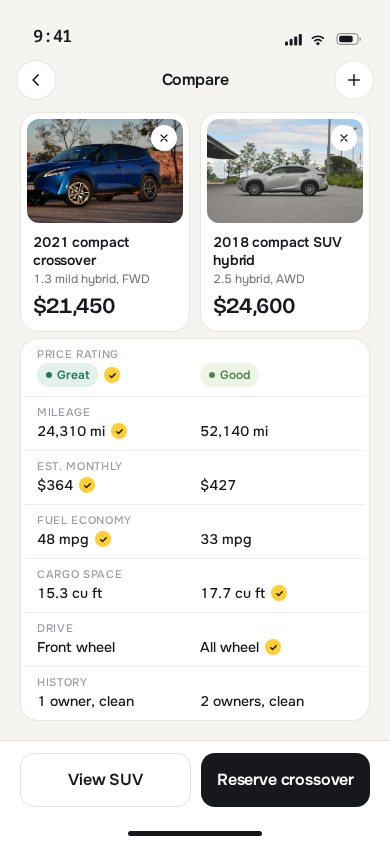
Forecourt is a complete used car app: welcome, sign in, a home with saved searches and price drops, search, filters, results with price ratings, a listing with photos, a gallery with marked imperfections, full specs, a history report, a market price check, compare, a finance calculator, reserve with delivery slots, checkout with a trade-in, a confirmation and live delivery tracking. Sellers get a value chart, a car details form and an instant offer, plus saved cars, a protection plan, notifications, account and settings. Chalk and white with ink and a canopy yellow.
| Detail | Value |
|---|---|
| Screen type | Detail |
| App | Forecourt: Buy and sell used cars |
| Category | Lifestyle |
| Design language | Minimal, light |
| Type | Bricolage Grotesque for headings, Onest for text |
| Colours | #f5f4f0 background, #ffffff surface, #16181b text, #6e7076 text-muted, #ffcf33 accent, #16181b accent-contrast, #1f7a55 secondary, #e8e6e0 border, #d4462c danger |
What this screen says
- Compare
- 2021 compact crossover
- 1.3 mild hybrid, FWD $21,450
- 2018 compact SUV hybrid
- 2.5 hybrid, AWD $24,600
- Price rating
- Great
- Good
- Mileage
- 24,310 mi
- 52,140 mi
- Est. monthly
- Fuel economy
- 48 mpg
- 33 mpg
- Cargo space
- 15.3 cu ft
- 17.7 cu ft
- Drive
- Front wheel
- All wheel
- History
- 1 owner, clean
- 2 owners, clean
- View SUV
- Reserve crossover
Around it in Forecourt
More detail screens
- Kibble Product: Pet supplies and autoship
- Filmlog Film: Film diary and reviews
- Guardrail Child: Parental controls and screen time
- Collar Escape alert: GPS pet tracker
- Postage Item: Send parcels and find drop-off points
- Specs Frame: Glasses with virtual try-on
- Circuit Product: Electronics store with trade-in and repairs
- Provenance Item: Authenticated luxury resale
- Gavel Lot: Live online auctions
- Tidy Deep clean: Book home cleaners
- Dorm Property: Find student housing
- Hem Quote: Tailoring and alterations, collected
Every lifestyle app detail screen
What makes a good detail screen
- Lead with what identifies the item. A large image or title, the price or status, and the key facts at the top. People should know they are in the right place at a glance.
- Keep the main action visible. A sticky bottom button for Add to cart, Book or Play stays reachable while people scroll through details.
- Order information by importance. The facts that decide the choice come first; reviews, specifications and fine print further down.
- Use progressive disclosure. Long descriptions, specifications and policies can expand on tap rather than filling the screen.
The full detail screen guide and every example
Remix Forecourt free: describe your own app and it is drawn in this design. Or get its files from $10: Figma, React Native, SwiftUI, Flutter and HTML.