Templates · Form and input screens · Social app · Flick
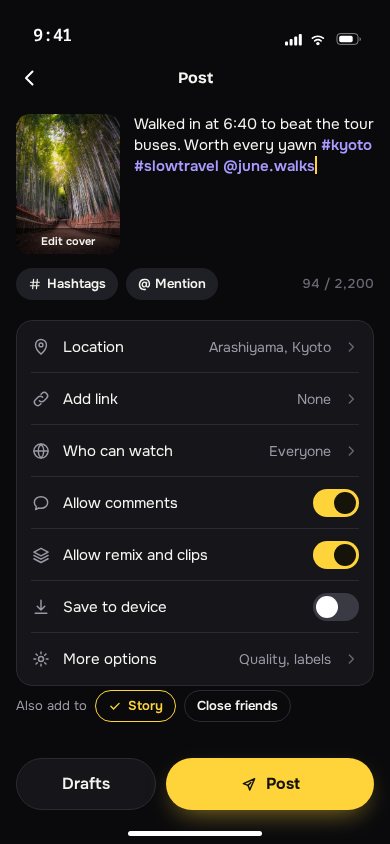
Flick Post screen
A form screen from Flick, a short video feed app template in a Dark-first style. Screen 15 of 25.
Flick is a complete short video app: welcome, picking interests and sign up, a For you feed and a Following feed, comments, a share sheet, discover with trends, search results, a hashtag, a sound, a creator page, the camera, the editor, posting and a posted screen, a live stream with gifts, an inbox and a chat, buying coins, creator analytics and earnings, a Flick Plus plan, your profile and settings. Ink black with sunflower yellow sparks and a soft lilac.
| Detail | Value |
|---|---|
| Screen type | Form |
| App | Flick: Short video feed |
| Category | Social |
| Design language | Dark-first, dark |
| Type | Bricolage Grotesque for headings, Onest for text |
| Colours | #0a0a0d background, #15151a surface, #f6f5f0 text, #9a99a6 text-muted, #ffd43b accent, #16130a accent-contrast, #a99bff secondary, #2a2a33 border, #ff5a5f danger |
What this screen says
- Post
- Edit cover
- Walked in at 6:40 to beat the tour buses. Worth every yawn #kyoto #slowtravel @june.walks
- Hashtags @ Mention 94 / 2,200
- Location Arashiyama, Kyoto
- Add link None
- Who can watch Everyone
- Allow comments
- Allow remix and clips
- Save to device
- More options Quality, labels
- Also add to Story Close friends
- Drafts
Around it in Flick
More form and input screens
- Blink Send to: Camera chat and stories
- Cipher Disappearing messages: Encrypted private messenger
- Commons New post: Friends, groups and events
- Tether Join circle: Family location and safety
- Facet Call link: Video calls with family and friends
- Stoop New post: Neighbourhood noticeboard
- Aura Drop a mood: Moods with close friends
- Kindly Log hours: Volunteering near you
- Cohort Request intro: Alumni and mentor network
- Kin New moment: Private family circle
- Confetti RSVP: Party invites and RSVPs
- Ripple Edit note: Voice notes social
What makes a good form screen
- Ask only what you need. Every field is a reason to stop. Remove optional fields or move them to later.
- Labels above fields. Visible labels stay readable while people type; placeholder-only labels disappear.
- Use the right keyboard and input. Number pads for amounts, email keyboards for email, pickers for dates and autofill for addresses and codes.
- Validate as people go. Show problems next to the field when people leave it, in words that say how to fix them.
The full form screen guide and every example
Remix Flick free: describe your own app and it is drawn in this design. Or get its files from $10: Figma, React Native, SwiftUI, Flutter and HTML.