Templates · Booking and checkout screens · Social app · Confetti
Confetti Review and send screen
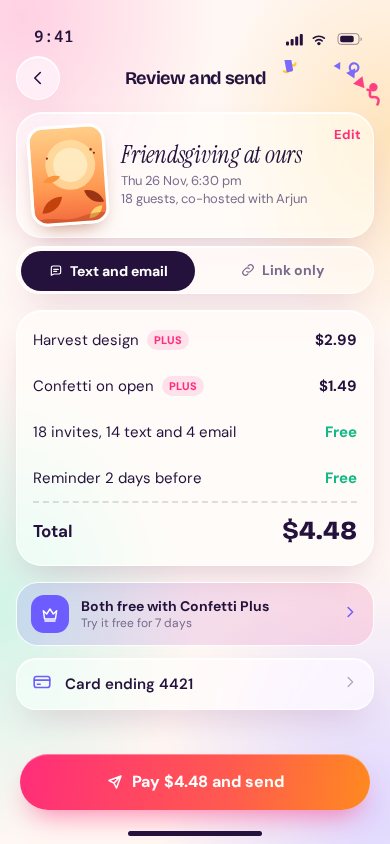
A checkout screen from Confetti, a party invites and RSVPs app template in a Glass style. Screen 12 of 25.
Confetti is a complete party app: welcome, sign in, a home with the invite waiting on you, the invite itself with a tear-off RSVP stub, an RSVP form and a confirmation, a gift list, then the host side: a new party, a gallery of invite designs, the invite editor, adding guests, review and send, invites sent, the party page, the guest list, an RSVP tracker, a potluck, the party chat and live arrivals on a map. Plus a calendar, a shared photo wall, notifications, a Plus plan, profile and settings. Sherbet glass with hot pink, tangerine and confetti in six colours.
| Detail | Value |
|---|---|
| Screen type | Checkout |
| App | Confetti: Party invites and RSVPs |
| Category | Social |
| Design language | Glass, light |
| Type | Bricolage Grotesque for headings, DM Sans for text |
| Colours | #fff7f3 background, #ffffff surface, #24123d text, #7a6b8c text-muted, #ff2d7a accent, #ffffff accent-contrast, #6d5cff secondary, #12b886 success, #ff9f1c warning, #ead9e6 border |
What this screen says
- Review and send
- Friendsgiving at oursThu 26 Nov, 6:30 pm
- 18 guests, co-hosted with Arjun
- Edit
- Text and email Link only
- Harvest designPLUS $2.99
- Confetti on openPLUS $1.49
- 18 invites, 14 text and 4 email Free
- Reminder 2 days before Free
- Total $4.48
- Both free with Confetti PlusTry it free for 7 days
- Card ending 4421
- Pay $4.48 and send
Around it in Confetti
More booking and checkout screens
- Flick Coins: Short video feed
- Squawk Subscribe: Short posts and live conversation
- Agora Give award: Communities, threads and votes
- Spark Boost: Swipe dating
- Commons Tickets: Friends, groups and events
- Tether Review plan: Family location and safety
- Stoop Pickup: Neighbourhood noticeboard
- Aura Confirm plan: Moods with close friends
- Kindly Pick a shift: Volunteering near you
- Cohort Book session: Alumni and mentor network
- Kin Photo book: Private family circle
- Ripple Send a tip: Voice notes social
Every social app checkout screen
What makes a good checkout screen
- Show the total early and honestly. Taxes, delivery and service fees should appear before the last step. A higher total on the final screen feels like a trick.
- Offer wallet payments. Apple Pay and Google Pay skip card typing entirely. Show them first when they are available.
- Ask for the minimum. Only the fields needed to deliver or book. Save details for next time.
- Let people review before paying. A clear summary of items, dates, address and price, with each part editable without starting over.
The full checkout screen guide and every example
Remix Confetti free: describe your own app and it is drawn in this design. Or get its files from $10: Figma, React Native, SwiftUI, Flutter and HTML.