Templates · Live tracking screens · Travel app · Fjord
Fjord Live voyage screen
A tracking screen from Fjord, a cruise companion on board app template in a Dark-first style. Screen 16 of 25.
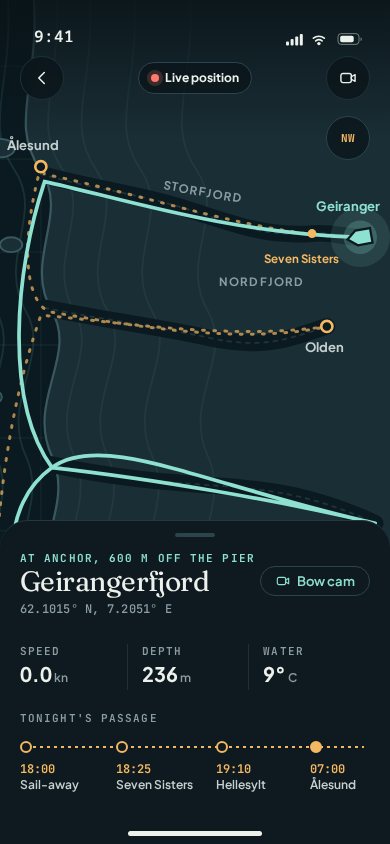
Fjord is a complete cruise companion: welcome, sign in with a booking reference, the safety drill, a today screen with the port, all aboard time and the day's plan, the itinerary on a nautical chart, port days, shore excursions with booking and a confirmation, a day planner, dining with a table reservation, a deck plan, the live voyage tracker, a bow camera, the onboard account, room service, Wi-Fi plans, the cabin, the cruise card, notifications, profile and settings. Fjord night slate with glacier mint and midnight sun amber.
| Detail | Value |
|---|---|
| Screen type | Tracking |
| App | Fjord: Cruise companion on board |
| Category | Travel |
| Design language | Dark-first, dark |
| Type | Fraunces for headings, Plus Jakarta Sans for text |
| Colours | #091317 background, #111e23 surface, #edf1ec text, #8b9ea3 text-muted, #8ee0d1 accent, #062a26 accent-contrast, #f5b862 secondary, #1f3138 border, #ff7a6b danger |
What this screen says
- Live position
- NW
- At anchor, 600 m off the pier
- Geirangerfjord
- Bow cam
- 62.1015° N, 7.2051° E
- Speed
- 0.0kn
- Depth
- 236m
- Water
- 9°C
- Tonight's passage
- 18:00Sail-away
- 18:25Seven Sisters
- 19:10Hellesylt
- 07:00Ålesund
Around it in Fjord
More live tracking screens
- Scoot Ride: E-scooter and e-bike rental
- Nomad Installing: Travel eSIM data plans
- Tern Live: Ferry and island hopping
- Berth Live journey: Night trains and sleeper cabins
- Caravan On the road: Campervan rental and road trips
- Layover Terminal map: Airport guide, gates and lounges
- Permit Application status: Visas and travel documents wallet
- Backroad Drive: Road trip planner with stops
- Bunk On the way: Hostels and backpacker meetups
- Piazza Walking: Self-guided city walking tours
- Atlas Navigation: Maps and navigation
- Aloft Live flight: Flight tracker
Every travel app tracking screen
What makes a good live tracking screen
- The live number is the hero. Arrival time, pace, distance or time left, in large type at the top or centre.
- Show status in words. "Driver is 3 minutes away" or "Halfway there" alongside the map or chart.
- Make it readable while moving. Large numbers, high contrast and big buttons for pause, stop or call.
- Keep updates calm. Smooth movement on the map and steady numbers; jumpy updates feel broken.
The full live tracking screen guide and every example
Remix Fjord free: describe your own app and it is drawn in this design. Or get its files from $10: Figma, React Native, SwiftUI, Flutter and HTML.