Templates · Detail screens · Lifestyle app · Fade
Fade Appointment screen
A detail screen from Fade, a barber booking app template in a Neubrutalism style. Screen 17 of 25.
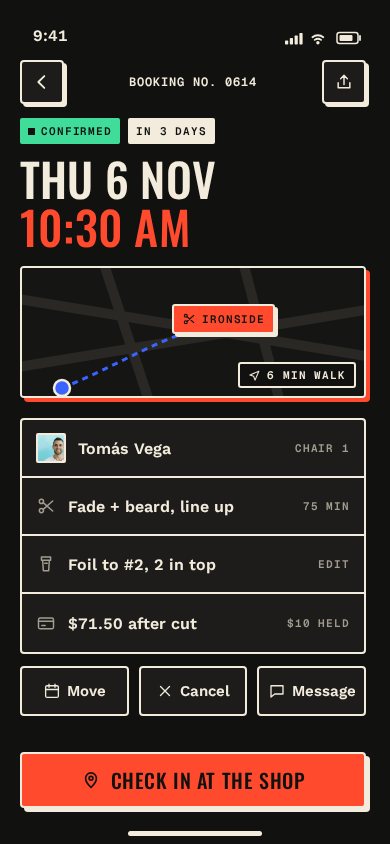
Fade is a complete barber booking app: welcome, sign in and a code, a home that knows when you are due, a map of shops nearby, search, a shop with its chairs and menu, a barber with a portfolio, a lookbook and a fade map for each style, services, a time picker, cut notes with guard numbers, review and a booked ticket, bookings and an appointment, a live walk in queue, rating with a tip, a cut log, a punch card, Fade Pass, notifications, profile and settings. Ink black, cream, pole red and cobalt.
| Detail | Value |
|---|---|
| Screen type | Detail |
| App | Fade: Barber booking |
| Category | Lifestyle |
| Design language | Neubrutalism, dark |
| Type | Oswald for headings, Work Sans for text |
| Colours | #111110 background, #1d1c1a surface, #f3ecdd text, #a39d90 text-muted, #ff4a2e accent, #111110 accent-contrast, #3b63ff secondary, #f3ecdd border, #3fdc9a success |
What this screen says
- Booking No. 0614
- Confirmed In 3 days
- Thu 6 Nov
- 10:30 AM
- Ironside 6 min walk
- Tomás Vega
- Chair 1
- Fade + beard, line up
- 75 min
- Foil to #2, 2 in top
- Edit
- $71.50 after cut
- $10 held
- Move
- Cancel
- Message
- Check in at the shop
Around it in Fade
More detail screens
- Specs Frame: Glasses with virtual try-on
- Circuit Product: Electronics store with trade-in and repairs
- Provenance Item: Authenticated luxury resale
- Gavel Lot: Live online auctions
- Tidy Deep clean: Book home cleaners
- Dorm Property: Find student housing
- Hem Quote: Tailoring and alterations, collected
- Lendly Item: Borrow things from neighbours
- Stub Artist: Fan to fan ticket resale
- Trove Idea: Visual ideas and boards
- Vidi Playlist: Video platform for creators
- Roll Photo info: Photo library and backups
Every lifestyle app detail screen
What makes a good detail screen
- Lead with what identifies the item. A large image or title, the price or status, and the key facts at the top. People should know they are in the right place at a glance.
- Keep the main action visible. A sticky bottom button for Add to cart, Book or Play stays reachable while people scroll through details.
- Order information by importance. The facts that decide the choice come first; reviews, specifications and fine print further down.
- Use progressive disclosure. Long descriptions, specifications and policies can expand on tap rather than filling the screen.
The full detail screen guide and every example
Remix Fade free: describe your own app and it is drawn in this design. Or get its files from $10: Figma, React Native, SwiftUI, Flutter and HTML.