Templates · Onboarding screens · Fitness app · Exhale
Exhale Your goals screen
An onboarding screen from Exhale, a breathwork sessions app template in a Glass style. Screen 2 of 25.
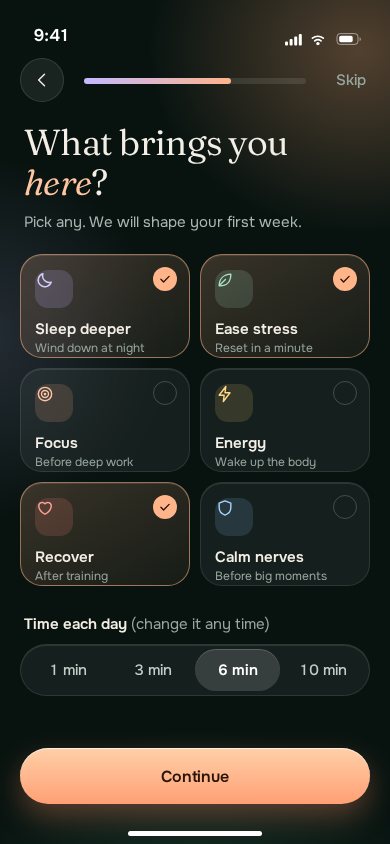
Exhale is a complete breathwork app: welcome, goals, sign in, a Today home with tonight's breath, explore techniques, a box breathing page, a custom pattern builder, a pre-session check-in, a live guided session around a glowing orb, breath hold rounds, a session summary, history, insights with HRV and calm minutes, a camera HRV check, programs and a sleep program, a guide, an audio lesson, soundscapes, reminders, notifications, a Plus plan and trial checkout, profile and settings. Pine black glass with apricot dawn light, lilac and sage.
| Detail | Value |
|---|---|
| Screen type | Onboarding |
| App | Exhale: Breathwork sessions |
| Category | Health and fitness |
| Design language | Glass, dark |
| Type | Fraunces for headings, Onest for text |
| Colours | #081310 background, #14211d surface, #f4efe6 text, #97a69f text-muted, #ffb48a accent, #2b150a accent-contrast, #c3b8ff secondary, #a6e3c6 success, #26332e border, #ff8a7a danger |
What this screen says
- Skip
- What brings you here?
- Pick any. We will shape your first week.
- Sleep deeperWind down at night
- Ease stressReset in a minute
- FocusBefore deep work
- EnergyWake up the body
- RecoverAfter training
- Calm nervesBefore big moments
- Time each day (change it any time)
- 1 min
- 3 min
- 6 min
- 10 min
- Continue
Around it in Exhale
More onboarding screens
- Lull Welcome: Sleep sounds and meditation
- Pace Welcome: Fitness tracker
- Flexpass Welcome: One membership, many studios
- Clinic Welcome: Find and book doctors
- Careline Welcome: Care for an ageing parent
- Velo Welcome: Live and on-demand indoor cycling
- Vantage Welcome: Sports watch companion
- Labwork Welcome: Book blood tests and see results
- Segment Welcome: Runs and rides with friends
- Nightly Welcome: Smart ring sleep and readiness
- Pillbox Welcome: Pharmacy refills and medicine reminders
- Rise Welcome: Alarm clock and sleep cycles
Every fitness app onboarding screen
What makes a good onboarding screen
- One idea per screen. Each screen should say one thing in a headline people can read in a second. If a screen needs a paragraph, it is doing too much.
- Personalise with a purpose. Ask a question only if the answer changes what people see next, like a goal, a level or an interest. Then show that the answer mattered.
- Explain permissions before asking. Show your own screen saying why you need notifications, location or the camera before the system prompt. People who understand the reason are more likely to allow it.
- Let people skip. A visible skip or "I'll do this later" respects returning users and the impatient. Make sure skipping still lands them somewhere useful.
The full onboarding screen guide and every example
Remix Exhale free: describe your own app and it is drawn in this design. Or get its files from $10: Figma, React Native, SwiftUI, Flutter and HTML.