Templates · Onboarding screens · Sports app · Eddy
Eddy Pick your rivers screen
An onboarding screen from Eddy, a river levels for paddlers app template in a Glass style. Screen 2 of 25.
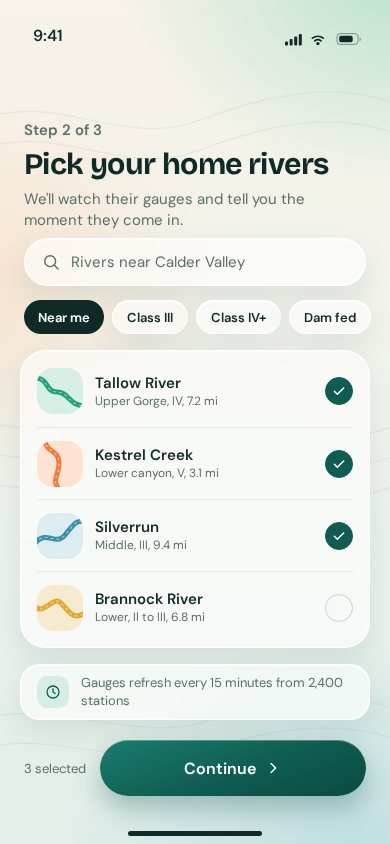
Eddy is a complete river levels app for kayakers and rafters: welcome, home rivers and sign in, a today screen with live gauges, a river map, search, a river section with its runnable range, a gauge hydrograph with forecast, a rapid guide and a rapid, dam releases, flow alerts and a new alert form, logging a run, a logbook with a run recap, live tracking on the water, a shuttle booking with review and confirmation, season stats, a Pro plan, notifications, profile and settings. Sand and celadon glass with deep river jade and flow colours from amber to crimson.
| Detail | Value |
|---|---|
| Screen type | Onboarding |
| App | Eddy: River levels for paddlers |
| Category | Sports |
| Design language | Glass, light |
| Type | Bricolage Grotesque for headings, DM Sans for text |
| Colours | #f4efe5 background, #ffffff surface, #102a27 text, #5b706b text-muted, #0f5c52 accent, #ffffff accent-contrast, #1fa27b secondary, #dfe6df border, #c8344f danger |
What this screen says
- Step 2 of 3
- Pick your home rivers
- We'll watch their gauges and tell you the moment they come in.
- Rivers near Calder Valley
- Near me Class III Class IV+ Dam fed
- Tallow River
- Upper Gorge, IV, 7.2 mi
- Kestrel Creek
- Lower canyon, V, 3.1 mi
- Silverrun
- Middle, III, 9.4 mi
- Brannock River
- Lower, II to III, 6.8 mi
- Gauges refresh every 15 minutes from 2,400 stations
- 3 selected
- Continue
Around it in Eddy
More onboarding screens
- Matchday Welcome: Football scores and fantasy
- Rally Welcome: Tennis and padel club
- Swell Welcome: Surf forecast
- Pitwall Welcome: Race engineering
- Elevens Welcome: Fantasy cricket leagues
- Scoreboard Welcome: Scores and news for every sport
- Bib Welcome: Find and enter races
- Wicket Welcome: Live cricket scores
- Courtside Welcome: Pickup basketball games
- Tack Welcome: Sailing wind and regatta tracker
- Frag Welcome: Esports tournaments and teams
- Canter Welcome: Riding stables and lessons
Every sports app onboarding screen
What makes a good onboarding screen
- One idea per screen. Each screen should say one thing in a headline people can read in a second. If a screen needs a paragraph, it is doing too much.
- Personalise with a purpose. Ask a question only if the answer changes what people see next, like a goal, a level or an interest. Then show that the answer mattered.
- Explain permissions before asking. Show your own screen saying why you need notifications, location or the camera before the system prompt. People who understand the reason are more likely to allow it.
- Let people skip. A visible skip or "I'll do this later" respects returning users and the impatient. Make sure skipping still lands them somewhere useful.
The full onboarding screen guide and every example
Remix Eddy free: describe your own app and it is drawn in this design. Or get its files from $10: Figma, React Native, SwiftUI, Flutter and HTML.