Templates · Onboarding screens · Social app · Duo
Duo Pair up screen
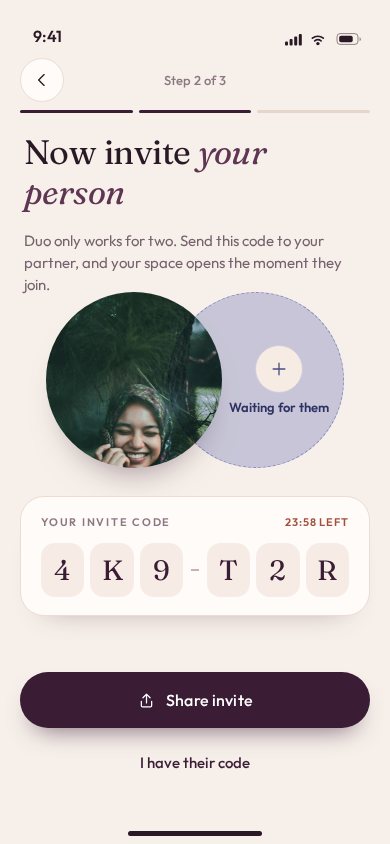
An onboarding screen from Duo, a social app template in a Luxury style. Screen 2 of 25.
Duo is a complete app for two: welcome, pairing with an invite code and sign in, a home with your days together, today's question and both moods, the question and both answers, a shared calendar that finds when you are both free, date ideas you both matched, an idea, planning a date, booking a table and the confirmation, live meet up tracking, memories and a single memory, an animated year recap, a love note, insights, milestones, a bucket list, a shared date fund, a membership plan, notifications, your couple profile and settings. Porcelain, aubergine, rosé and dusk.
| Detail | Value |
|---|---|
| Screen type | Onboarding |
| App | Duo: An app for two |
| Category | Social |
| Design language | Luxury, light |
| Type | Fraunces for headings, Outfit for text |
| Colours | #f7f0ea background, #fffbf8 surface, #2a1825 text, #8c7682 text-muted, #3a1c34 accent, #ffffff accent-contrast, #e08f7b secondary, #ecdcd2 border, #c4553f danger |
What this screen says
- Step 2 of 3
- Now invite your person
- Duo only works for two. Send this code to your partner, and your space opens the moment they join.
- Waiting for them
- Your invite code 23:58 left
- 4 K 9 T 2 R
- Share invite
- I have their code
Around it in Duo
More onboarding screens
- Civic Welcome: Report issues and city services
- Guild Welcome: Community servers with voice and text chat
- Parrot Welcome: Private messaging, groups and calls
- Carrier Welcome: Cloud messaging with channels
- Vista Welcome: Photos, stories and reels
- Flick Welcome: Short video feed
- Squawk Welcome: Short posts and live conversation
- Agora Welcome: Communities, threads and votes
- Spark Welcome: Swipe dating
- Candid Welcome: One real photo a day
- Blink Welcome: Camera chat and stories
- Cipher Welcome: Encrypted private messenger
Every social app onboarding screen
What makes a good onboarding screen
- One idea per screen. Each screen should say one thing in a headline people can read in a second. If a screen needs a paragraph, it is doing too much.
- Personalise with a purpose. Ask a question only if the answer changes what people see next, like a goal, a level or an interest. Then show that the answer mattered.
- Explain permissions before asking. Show your own screen saying why you need notifications, location or the camera before the system prompt. People who understand the reason are more likely to allow it.
- Let people skip. A visible skip or "I'll do this later" respects returning users and the impatient. Make sure skipping still lands them somewhere useful.
The full onboarding screen guide and every example
Remix Duo free: describe your own app and it is drawn in this design. Or get its files from $10: Figma, React Native, SwiftUI, Flutter and HTML.