Templates · Form and input screens · Lifestyle app · Dorm
Dorm Apply screen
A form screen from Dorm, a find student housing app template in a Gen Z style. Screen 14 of 25.
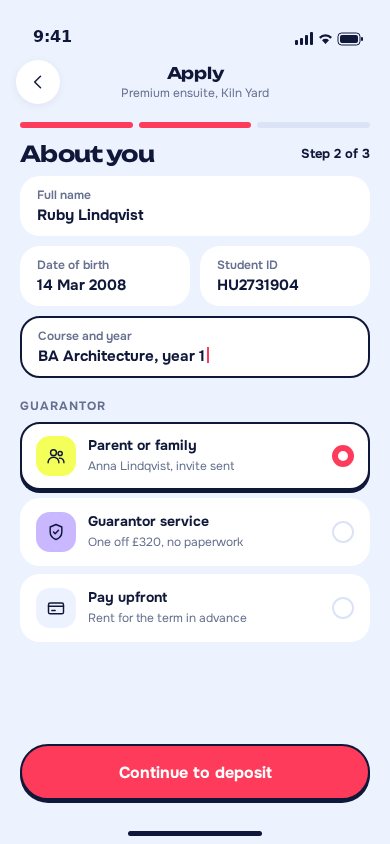
Dorm is a complete student housing app: welcome, pick your university, sign in, a home that picks up your application, search with filters, a price pin map, a property page with room types, amenities and commute times, a room page with a floor plan, a virtual tour, a commute planner, compare, saved places, a three step application, deposit checkout and a booking confirmed key fob, flatmate matching and a flatmate profile, chat with the property team, payments, a move in checklist, Dorm Plus, notifications, profile and settings. Sky milk and white with cherry, lemon, lilac and ink.
| Detail | Value |
|---|---|
| Screen type | Form |
| App | Dorm: Find student housing |
| Category | Lifestyle |
| Design language | Gen Z, light |
| Type | Unbounded for headings, Onest for text |
| Colours | #edf2ff background, #ffffff surface, #10183a text, #66708f text-muted, #ff3b5c accent, #ffffff accent-contrast, #f4ff5a secondary, #dbe3f6 border, #22c58b success, #c9b8ff tertiary |
What this screen says
- ApplyPremium ensuite, Kiln Yard
- About you
- Step 2 of 3
- Full nameRuby Lindqvist
- Date of birth14 Mar 2008
- Student IDHU2731904
- Course and yearBA Architecture, year 1
- Guarantor
- Parent or familyAnna Lindqvist, invite sent
- Guarantor serviceOne off £320, no paperwork
- Pay upfrontRent for the term in advance
- Continue to deposit
Around it in Dorm
More form and input screens
- Column Compose: Newsletters and independent writers
- Fetch Add pet: Dog walkers and pet sitters
- Forecourt Finance: Buy and sell used cars
- Tower Top up: Mobile plan, data and bills
- Haul Return item: Bargain fashion and finds
- Muse Prompt: AI image studio
- Admit Transfer: Events and tickets near you
- Arcade Install: Game store, library and friends
- Natal New entry: Birth charts and daily astrology
- Sillage Log wear: Fragrance wardrobe
- Hamper Add item: Wishlists and gift registry
- Fade Cut notes: Barber booking
Every lifestyle app form screen
What makes a good form screen
- Ask only what you need. Every field is a reason to stop. Remove optional fields or move them to later.
- Labels above fields. Visible labels stay readable while people type; placeholder-only labels disappear.
- Use the right keyboard and input. Number pads for amounts, email keyboards for email, pickers for dates and autofill for addresses and codes.
- Validate as people go. Show problems next to the field when people leave it, in words that say how to fix them.
The full form screen guide and every example
Remix Dorm free: describe your own app and it is drawn in this design. Or get its files from $10: Figma, React Native, SwiftUI, Flutter and HTML.