Templates · Form and input screens · Lifestyle app · Natal
Natal New entry screen
A form screen from Natal, a birth charts and daily astrology app template in a Luxury style. Screen 15 of 25.
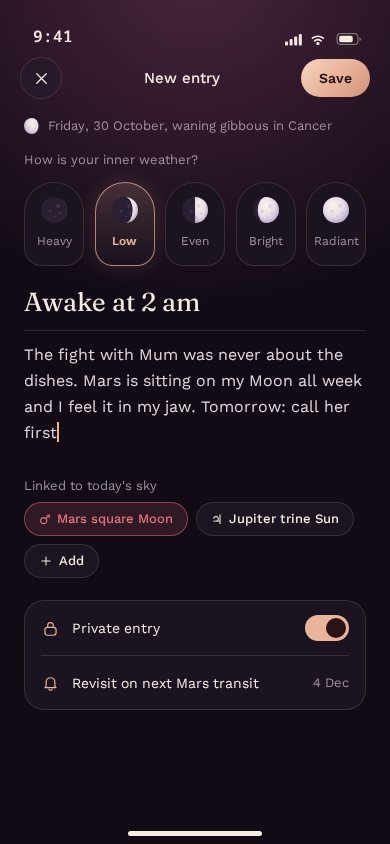
Natal is a complete astrology app: welcome, birth details and sign in, a daily reading with the moon and today's transits, a full birth chart wheel, a placement page, an aspect grid, transits and a transit page, a cosmic calendar, a live moon tracker, friends and a synastry match, a journal with a new entry and mood patterns against the moon, a marketplace of astrologers with a profile, booking, confirmation and a live video reading, a Luminary plan, notifications, profile and settings. Aubergine and rosé copper with lilac moonlight.
| Detail | Value |
|---|---|
| Screen type | Form |
| App | Natal: Birth charts and daily astrology |
| Category | Lifestyle |
| Design language | Luxury, dark |
| Type | Fraunces for headings, Work Sans for text |
| Colours | #120b16 background, #1c1320 surface, #f5ebe3 text, #a3929d text-muted, #e8b49a accent, #2a1216 accent-contrast, #c3b1e1 secondary, #3a2a38 border, #e5737c danger |
What this screen says
- New entry
- Save
- Friday, 30 October, waning gibbous in Cancer
- How is your inner weather?
- Heavy
- Low
- Even
- Bright
- Radiant
- Awake at 2 am
- The fight with Mum was never about the dishes. Mars is sitting on my Moon all week and I feel it in my jaw....
- Linked to today's sky
- ♂︎ Mars square Moon ♃︎ Jupiter trine Sun Add
- Private entry
- Revisit on next Mars transit 4 Dec
Around it in Natal
More form and input screens
- Posy Build a bouquet: Flower delivery and weekly stems
- Fern Log watering: Plant care
- Doorstep Filters: Homes for sale and rent
- Rewear Make an offer: Secondhand fashion marketplace
- Laced Release alert: Sneaker drops and raffles
- Gloss Write a review: Salon and spa booking
- Vow Add expense: Wedding planner
- Drizzle Edit widget: Weather with living skies
- Shelf Log progress: Reading tracker and book club
- Marquee Write a review: Cinema tickets and watchlist
- Handy Address: Home services
- Tasker Task details: Book and do local odd jobs
Every lifestyle app form screen
What makes a good form screen
- Ask only what you need. Every field is a reason to stop. Remove optional fields or move them to later.
- Labels above fields. Visible labels stay readable while people type; placeholder-only labels disappear.
- Use the right keyboard and input. Number pads for amounts, email keyboards for email, pickers for dates and autofill for addresses and codes.
- Validate as people go. Show problems next to the field when people leave it, in words that say how to fix them.
The full form screen guide and every example
Remix Natal free: describe your own app and it is drawn in this design. Or get its files from $10: Figma, React Native, SwiftUI, Flutter and HTML.