Templates · Form and input screens · Lifestyle app · Fade
Fade Cut notes screen
A form screen from Fade, a barber booking app template in a Neubrutalism style. Screen 13 of 25.
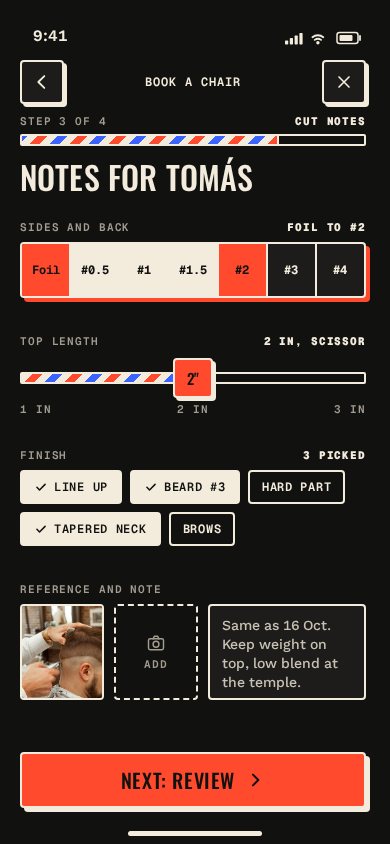
Fade is a complete barber booking app: welcome, sign in and a code, a home that knows when you are due, a map of shops nearby, search, a shop with its chairs and menu, a barber with a portfolio, a lookbook and a fade map for each style, services, a time picker, cut notes with guard numbers, review and a booked ticket, bookings and an appointment, a live walk in queue, rating with a tip, a cut log, a punch card, Fade Pass, notifications, profile and settings. Ink black, cream, pole red and cobalt.
| Detail | Value |
|---|---|
| Screen type | Form |
| App | Fade: Barber booking |
| Category | Lifestyle |
| Design language | Neubrutalism, dark |
| Type | Oswald for headings, Work Sans for text |
| Colours | #111110 background, #1d1c1a surface, #f3ecdd text, #a39d90 text-muted, #ff4a2e accent, #111110 accent-contrast, #3b63ff secondary, #f3ecdd border, #3fdc9a success |
What this screen says
- Book a chair
- Step 3 of 4 Cut notes
- Notes for Tomás
- Sides and back Foil to #2
- Foil #0.5 #1 #1.5 #2 #3 #4
- Top length 2 in, scissor
- 2"
- 1 in 2 in 3 in
- Finish 3 picked
- Line up Beard #3 Hard part Tapered neck Brows
- Reference and note
- Add
- Same as 16 Oct. Keep weight on top, low blend at the temple.
- Next: review
Around it in Fade
More form and input screens
- Filmlog Log film: Film diary and reviews
- Guardrail Daily limits: Parental controls and screen time
- Collar Edit zone: GPS pet tracker
- Postage Your address: Send parcels and find drop-off points
- Specs Lenses: Glasses with virtual try-on
- Circuit Trade in: Electronics store with trade-in and repairs
- Provenance Make an offer: Authenticated luxury resale
- Gavel Max bid: Live online auctions
- Tidy Your home: Book home cleaners
- Dorm Filters: Find student housing
- Hem Alteration: Tailoring and alterations, collected
- Lendly Return: Borrow things from neighbours
Every lifestyle app form screen
What makes a good form screen
- Ask only what you need. Every field is a reason to stop. Remove optional fields or move them to later.
- Labels above fields. Visible labels stay readable while people type; placeholder-only labels disappear.
- Use the right keyboard and input. Number pads for amounts, email keyboards for email, pickers for dates and autofill for addresses and codes.
- Validate as people go. Show problems next to the field when people leave it, in words that say how to fix them.
The full form screen guide and every example
Remix Fade free: describe your own app and it is drawn in this design. Or get its files from $10: Figma, React Native, SwiftUI, Flutter and HTML.