Templates · Form and input screens · Fitness app · Velo
Velo Your goals screen
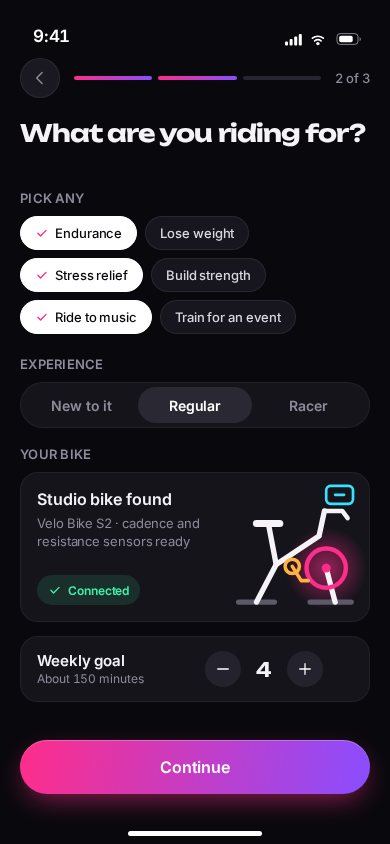
A form screen from Velo, a live and on-demand indoor cycling app template in a Dark-first style. Screen 2 of 25.
Velo is a complete indoor cycling app: welcome, goals and sign in, a home with your streak, the next live ride and your stack, a class library with filters, class details with the playlist and effort profile, the live schedule, booking and a confirmation, a countdown, the ride itself with three live metrics and a leaderboard, a summary with an output graph, instructors, programs, a stack, progress, achievements, membership, notifications, profile and settings. Stage black with hot magenta, cyan and amber.
| Detail | Value |
|---|---|
| Screen type | Form |
| App | Velo: Live and on-demand indoor cycling |
| Category | Health and fitness |
| Design language | Dark-first, dark |
| Type | Unbounded for headings, Inter for text |
| Colours | #09090d background, #15141b surface, #f5f3f8 text, #8e8b9b text-muted, #ff2d8a accent, #ffffff accent-contrast, #36e3ff secondary, #26242f border, #ffb23e warning |
What this screen says
- 2 of 3
- What are you riding for?
- PICK ANY
- Endurance Lose weight Stress relief Build strength Ride to music Train for an event
- EXPERIENCE
- New to it Regular Racer
- YOUR BIKE
- Studio bike found
- Velo Bike S2 · cadence and resistance sensors ready
- Connected
- Weekly goal
- About 150 minutes
- Continue
Around it in Velo
More form and input screens
- Plate Quick add: Calorie and macro tracker
- Vita Log a reading: Personal health record
- Lull Sleep timer: Sleep sounds and meditation
- Flexpass Filters: One membership, many studios
- Clinic Filters: Find and book doctors
- Careline New task: Care for an ageing parent
- Vantage Edit my day: Sports watch companion
- Labwork Collection: Book blood tests and see results
- Segment Save activity: Runs and rides with friends
- Nightly Add tags: Smart ring sleep and readiness
- Pillbox Add medicine: Pharmacy refills and medicine reminders
- Rise Set alarm: Alarm clock and sleep cycles
What makes a good form screen
- Ask only what you need. Every field is a reason to stop. Remove optional fields or move them to later.
- Labels above fields. Visible labels stay readable while people type; placeholder-only labels disappear.
- Use the right keyboard and input. Number pads for amounts, email keyboards for email, pickers for dates and autofill for addresses and codes.
- Validate as people go. Show problems next to the field when people leave it, in words that say how to fix them.
The full form screen guide and every example
Remix Velo free: describe your own app and it is drawn in this design. Or get its files from $10: Figma, React Native, SwiftUI, Flutter and HTML.