Templates · Player, camera and editor screens · Fitness app · Dew
Dew Analysing screen
A media screen from Dew, an AI skin scan and routine app template in a Clinical style. Screen 6 of 25.
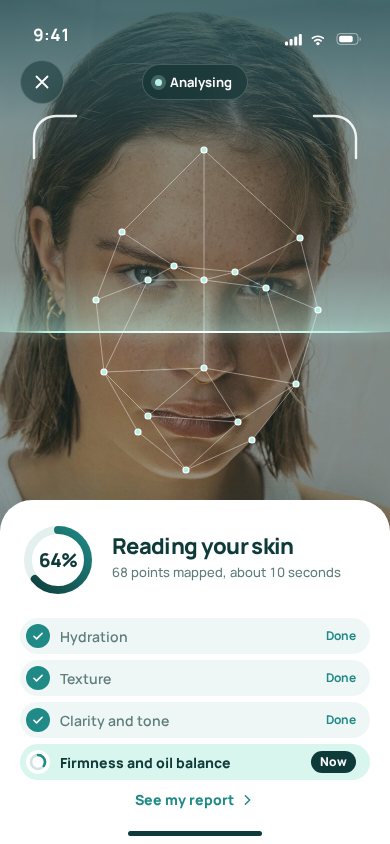
Dew is a complete AI skin care app: onboarding with goals and skin type, a guided face scan, a skin report with a score ring and a numbered face map, concerns in detail, a home with today's score and routine, morning and evening routines with timed steps, a routine builder, a product shelf, product pages with ingredient safety, a product scanner, conflict checks, progress with compare photos, a skin diary, insights, a membership, profile and settings. Pale aqua and white with deep teal, a dewy mint to aqua gradient and soft coral.
| Detail | Value |
|---|---|
| Screen type | Media |
| App | Dew: AI skin scan and routine |
| Category | Health and fitness |
| Design language | Clinical, light |
| Type | Manrope |
| Colours | #eef7f6 background, #ffffff surface, #0e3b3a text, #6b8a88 text-muted, #0e3b3a accent, #ffffff accent-contrast, #9fe4e6 secondary, #dcecea border, #ff8f7a danger |
What this screen says
- Analysing
- Reading your skin
- 68 points mapped, about 10 seconds
- Hydration
- Done
- Texture
- Clarity and tone
- Firmness and oil balance
- Now
- See my report
Around it in Dew
More player, camera and editor screens
- Pillbox Scan label: Pharmacy refills and medicine reminders
- Rise Wake up: Alarm clock and sleep cycles
- Ward Video visit: Patient portal for results, visits and messages
- Level Meal camera: Glucose monitor companion
- Reformer Video: Pilates studio booking
- Mend Guided: Physio and rehab exercises
- Tabata Exercise: HIIT interval timer
- Jab Class video: Boxing workouts with a smart bag
- Exhale HRV check: Breathwork sessions
- Bump Scan: Pregnancy week by week
- Morsel Scan: AI calorie tracker
- Medly Video visit: Doctor on call
Every fitness app media screen
What makes a good media player screen
- Content takes the space. Artwork, video or the camera view should fill most of the screen.
- Primary controls in the thumb zone. Play and pause, the shutter or the main tool, large and low on the screen.
- Show progress and position. A scrubber with elapsed and remaining time, or the step in a lesson.
- Hide secondary controls until needed. Lyrics, queue, filters and advanced tools can live behind a tap or a swipe.
The full media player screen guide and every example
Remix Dew free: describe your own app and it is drawn in this design. Or get its files from $10: Figma, React Native, SwiftUI, Flutter and HTML.