Templates · Player, camera and editor screens · Fitness app · Level
Level Meal camera screen
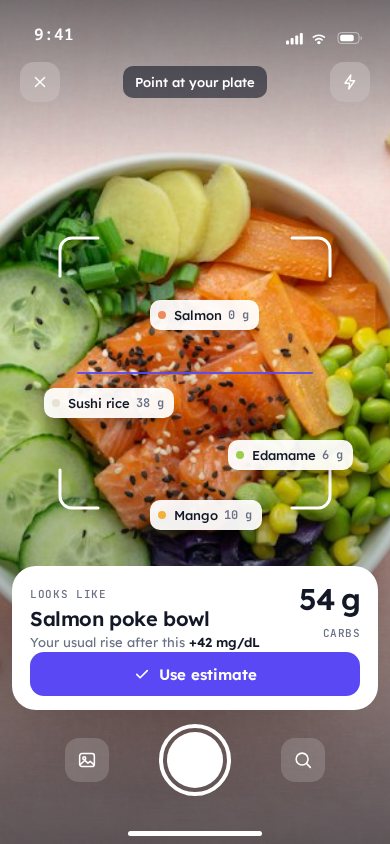
A media screen from Level, a glucose monitor companion app template in a Clinical style. Screen 9 of 25.
Level is a complete companion for a continuous glucose monitor: welcome, sign in, sensor pairing and target range setup, a today screen with the live reading in the level vial, a 24 hour graph, a single reading, logging carbs, insulin and exercise, a meal camera, a meal's glucose response, food search, the logbook, an urgent low alert, alert settings, 14 day insights with an ambulatory glucose profile, time in range, sensor life, a care team, a clinic report, a sensor refill checkout with confirmation, Level Plus, notifications, profile and settings. Cool white and ink navy with signal violet, range green, amber for highs and coral red for lows.
| Detail | Value |
|---|---|
| Screen type | Media |
| App | Level: Glucose monitor companion |
| Category | Health and fitness |
| Design language | Clinical, light |
| Type | JetBrains Mono for headings, Lexend for text |
| Colours | #f4f5f8 background, #ffffff surface, #121826 text, #6b7285 text-muted, #5a48f5 accent, #ffffff accent-contrast, #19b57c secondary, #e6e8ef border, #ef4a5a danger |
What this screen says
- Point at your plate
- Salmon0 g
- Sushi rice38 g
- Edamame6 g
- Mango10 g
- Looks like
- Salmon poke bowl
- Your usual rise after this +42 mg/dL
- 54 gCARBS
- Use estimate
Around it in Level
More player, camera and editor screens
- Vantage Watch faces: Sports watch companion
- Labwork Collect sample: Book blood tests and see results
- Segment Replay: Runs and rides with friends
- Nightly Breathe: Smart ring sleep and readiness
- Pillbox Scan label: Pharmacy refills and medicine reminders
- Rise Wake up: Alarm clock and sleep cycles
- Ward Video visit: Patient portal for results, visits and messages
- Reformer Video: Pilates studio booking
- Mend Guided: Physio and rehab exercises
- Tabata Exercise: HIIT interval timer
- Jab Class video: Boxing workouts with a smart bag
- Exhale HRV check: Breathwork sessions
Every fitness app media screen
What makes a good media player screen
- Content takes the space. Artwork, video or the camera view should fill most of the screen.
- Primary controls in the thumb zone. Play and pause, the shutter or the main tool, large and low on the screen.
- Show progress and position. A scrubber with elapsed and remaining time, or the step in a lesson.
- Hide secondary controls until needed. Lyrics, queue, filters and advanced tools can live behind a tap or a swipe.
The full media player screen guide and every example
Remix Level free: describe your own app and it is drawn in this design. Or get its files from $10: Figma, React Native, SwiftUI, Flutter and HTML.