Templates · Form and input screens · Sports app · Whistle
Whistle Team sheet screen
A form screen from Whistle, a grassroots league manager for coaches app template in an Enterprise style. Screen 8 of 25.
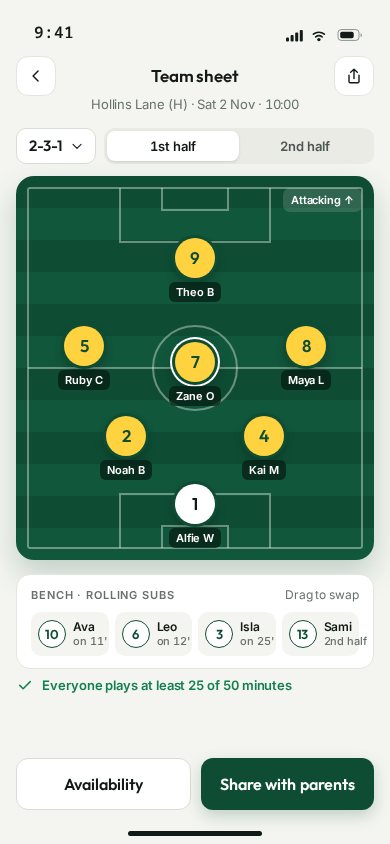
Whistle is a complete team manager for a junior football coach: welcome, team setup and sign in, a match day home, fixtures, a match page, player availability, a drag and drop team sheet on a chalk pitch, a live match with a fair minutes tracker, goal logging and a full time report, the league table and team stats, the squad, a player, adding a player, a training plan, finding and booking a pitch, subs collection, notifications, a club plan, the coach profile and settings. Chalk white and mown turf green with kit yellow and shield crests.
| Detail | Value |
|---|---|
| Screen type | Form |
| App | Whistle: Grassroots league manager for coaches |
| Category | Sports |
| Design language | Enterprise, light |
| Type | Outfit for headings, Inter for text |
| Colours | #f4f5f0 background, #ffffff surface, #111a16 text, #67716b text-muted, #0e4d34 accent, #ffffff accent-contrast, #ffd23f secondary, #e3e6de border, #c9372c danger |
What this screen says
- Team sheet
- Hollins Lane (H) · Sat 2 Nov · 10:00
- 1st half 2nd half
- Attacking ↑
- 9Theo B
- 5Ruby C
- 7Zane O
- 8Maya L
- 2Noah B
- 4Kai M
- 1Alfie W
- Bench · rolling subs Drag to swap
- 10Avaon 11'
- 6Leoon 12'
- 3Islaon 25'
- 13Sami2nd half
- Everyone plays at least 25 of 50 minutes
- Availability
- Share with parents
Around it in Whistle
More form and input screens
- Eddy New alert: River levels for paddlers
- Oche New game: Darts scorer and leagues
- Cairn Download region: Trails, contours and summits on one map sheet
- Lapse Log a set: Swim training
- Angler Log a catch: A fishing log drawn on the depth chart
- Piste Book lesson: Ski resort companion
- Crag Log a send: Climbing gym logbook
- Fairway Your game: Golf course guide and scorecard
- Matchday Captain: Football scores and fantasy
- Rally Enter score: Tennis and padel club
- Swell Log session: Surf forecast
- Pitwall Simulation setup: Race engineering
What makes a good form screen
- Ask only what you need. Every field is a reason to stop. Remove optional fields or move them to later.
- Labels above fields. Visible labels stay readable while people type; placeholder-only labels disappear.
- Use the right keyboard and input. Number pads for amounts, email keyboards for email, pickers for dates and autofill for addresses and codes.
- Validate as people go. Show problems next to the field when people leave it, in words that say how to fix them.
The full form screen guide and every example
Remix Whistle free: describe your own app and it is drawn in this design. Or get its files from $10: Figma, React Native, SwiftUI, Flutter and HTML.