Templates · Success and confirmation screens · Smart home app · Couch
Couch Rented screen
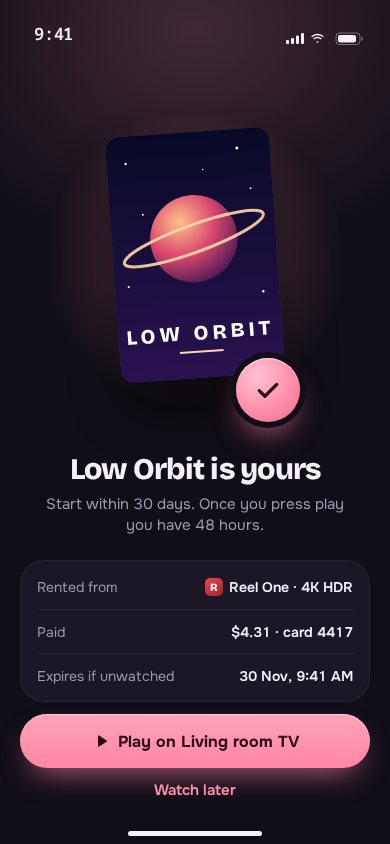
A success screen from Couch, a smart home app template in a Dark-first style. Screen 9 of 25.
Couch is a complete TV companion: welcome, picking your services, sign in, a home with the TV you are connected to, continue watching and picks across services, a title page with where to watch, episodes, prices to stream, rent or buy, renting a film with a confirmation, search, browse by mood, one watchlist, a live channel guide and a live match, a device picker, a d-pad remote, a trackpad, typing on the TV, a casting screen, your watching week with cost per hour, family profiles, a profile, Couch Plus, notifications and settings. Deep aubergine with velvet rose and butter yellow.
| Detail | Value |
|---|---|
| Screen type | Success |
| App | Couch: TV remote, casting and watchlist |
| Category | Smart home |
| Design language | Dark-first, dark |
| Type | Bricolage Grotesque for headings, Onest for text |
| Colours | #110e17 background, #1b1724 surface, #f5f0fa text, #a198b0 text-muted, #ff8fab accent, #2a0b16 accent-contrast, #ffd27a secondary, #2b2538 border, #ff5a5f danger |
What this screen says
- Low Orbit is yours
- Start within 30 days. Once you press play you have 48 hours.
- Rented from RReel One · 4K HDR
- Paid $4.31 · card 4417
- Expires if unwatched 30 Nov, 9:41 AM
- Play on Living room TV
- Watch later
Around it in Couch
More success and confirmation screens
- Dusk Scenario saved: Smart home scenarios
- Lumen Device added: Smart home energy
- Abode Device added: Smart home devices
- Boxed Booked: Book movers and plan moving day
- Meter Reading sent: Your energy supplier account
- Chime Routine saved: Voice assistant and smart speaker
- Latch Key sent: Smart locks and guest access
- Mesh Node added: Home Wi-Fi network
- Decibel Tuning done: Multi-room speakers
- Nursery Invite sent: Baby monitor camera and sleep
- Porch Plan active: Home security cameras
- Sundial Booked: Solar panels and home battery
Every smart home app success screen
What makes a good confirmation screen
- Confirm in the headline. "Payment sent", "Table booked for Friday at 8" or "Lesson complete" in plain words, with a clear success colour or icon.
- Repeat the key details. Amount, date, reference number or score, so people do not need to check elsewhere that the right thing happened.
- Say what happens next. When the order arrives, when the money lands, when the next lesson unlocks.
- Offer the next step. Track the order, add to calendar, share, or start the next lesson. One primary action and a way back home.
The full confirmation screen guide and every example
Remix Couch free: describe your own app and it is drawn in this design. Or get its files from $10: Figma, React Native, SwiftUI, Flutter and HTML.