Templates · Sign in and sign up screens · Food app · Ember
Ember Sign in screen
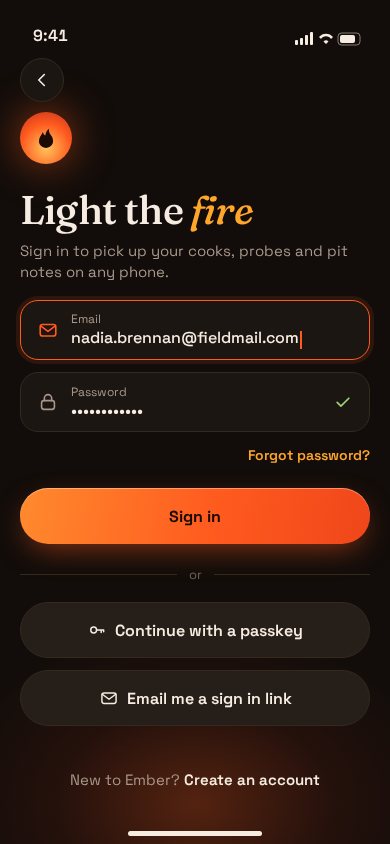
A sign in screen from Ember, a smoker and grill thermometer app template in a Dark-first style. Screen 2 of 25.
Ember is a complete wireless meat thermometer: welcome, pairing the probes, sign in, a home with the cook in progress, a live cook dial with pit and meat temperatures, a single probe with its four sensors, the cook graph with the stall and the wrap, alerts, starting a new cook, cut guides and a recipe, a rest timer, a finished cook, the cook log and a recap, pit stats, devices, a shop with checkout and an order placed, a Pro plan, notifications, profile and settings. Soot black and charcoal with an ember to amber glow.
| Detail | Value |
|---|---|
| Screen type | Sign in |
| App | Ember: Smoker and grill thermometer |
| Category | Food |
| Design language | Dark-first, dark |
| Type | Fraunces for headings, Space Grotesk for text |
| Colours | #120d0a background, #1c1612 surface, #f7ece1 text, #a8978a text-muted, #ff5b1f accent, #1a0b04 accent-contrast, #ffa62b secondary, #33291f border, #8ab4c8 info, #9ed27a success |
What this screen says
- Light the fire
- Sign in to pick up your cooks, probes and pit notes on any phone.
- Emailnadia.brennan@fieldmail.com
- Password••••••••••••
- Forgot password?
- Sign in
- or
- Continue with a passkey
- Email me a sign in link
- New to Ember? Create an account
Around it in Ember
More sign in and sign up screens
- Nosh Sign in: Local restaurant reviews
- Buns Sign in: Burger chain ordering and deals
- Slice Sign in: Pizza ordering with a live tracker
- Crate Sign up: Meal kits delivered weekly
- Dash Sign in: Ten minute grocery delivery
- Aisle Sign in: Shared grocery lists
- Menu Sign in: Scan, order and pay at the table
- Mart Sign in: Supermarket app with loyalty and scan and go
- Rescue Sign in: Surprise bags of surplus food
- Omakase Sign in: Chef's counter reservations
- Lunchbox Sign in: School lunch planner for parents
- Agave Sign up: Cocktails and home bar
What makes a good login screen
- Offer the fastest option first. Sign in with Apple, Google or a passkey takes one tap. If you support them, put them above the email form. Apple asks apps that use a third-party login like Google to also offer an equivalent privacy-focused option, such as Sign in with Apple.
- Separate sign in from sign up clearly. Use different headings and buttons, and a clear link to switch. People who already have an account should never end up creating a second one by accident.
- Use the right keyboard and autofill. Email fields should open the email keyboard and support password managers and one-time code autofill. Small details, big difference in how many people get through.
- Write errors that help. "That password doesn't match this email" is better than "Error 401". Keep what people typed so they only fix the part that was wrong.
The full login screen guide and every example
Remix Ember free: describe your own app and it is drawn in this design. Or get its files from $10: Figma, React Native, SwiftUI, Flutter and HTML.