Templates · Player, camera and editor screens · Social app · Commons
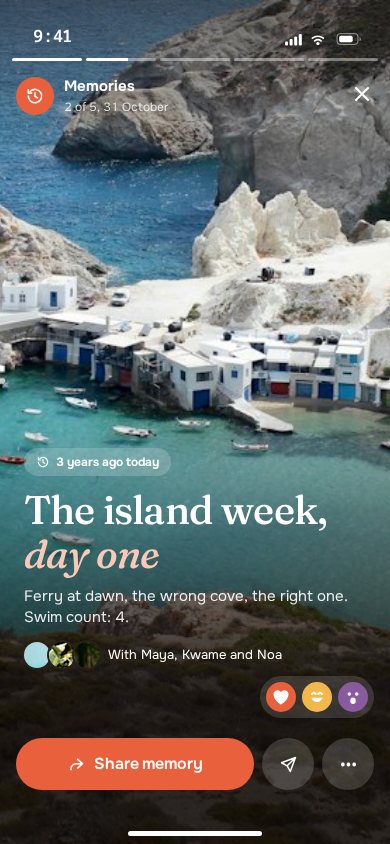
Commons Memories screen
A media screen from Commons, a social app template in a Minimal style. Screen 20 of 25.
Commons is a complete everyday social app: welcome, find friends, sign in, a feed with today circles, posts with reactions and threaded comments, a composer, search, friend requests and birthdays, groups and a group page with admin insights, events with tickets, checkout and a ticket stub, a new event form, a neighbourhood marketplace with a listing and a seller chat, messages, memories, notifications, a Plus plan, profile and settings. Warm oat and white with persimmon, pine and butter.
| Detail | Value |
|---|---|
| Screen type | Media |
| App | Commons: Friends, groups and events |
| Category | Social |
| Design language | Minimal, light |
| Type | Fraunces for headings, Onest for text |
| Colours | #f6f1ea background, #ffffff surface, #201a16 text, #8a7f75 text-muted, #e8603c accent, #ffffff accent-contrast, #2e5e4e secondary, #ebe3d8 border, #d0402e danger |
What this screen says
- Memories
- 2 of 5, 31 October
- 3 years ago today
- The island week, day one
- Ferry at dawn, the wrong cove, the right one. Swim count: 4.
- With Maya, Kwame and Noa
- Share memory
Around it in Commons
More player, camera and editor screens
- Banter Disappearing photo: Live messenger
- Natter Story: Minimal messenger
- Quorum Photo: Questions and expert answers
- Backer Video: Support creators with memberships
- Pledge Campaign video: Back creative projects
- Guild Voice room: Community servers with voice and text chat
- Parrot Shared media: Private messaging, groups and calls
- Carrier Photo: Cloud messaging with channels
- Vista Story: Photos, stories and reels
- Flick Camera: Short video feed
- Squawk Photo: Short posts and live conversation
- Agora Viewer: Communities, threads and votes
What makes a good media player screen
- Content takes the space. Artwork, video or the camera view should fill most of the screen.
- Primary controls in the thumb zone. Play and pause, the shutter or the main tool, large and low on the screen.
- Show progress and position. A scrubber with elapsed and remaining time, or the step in a lesson.
- Hide secondary controls until needed. Lyrics, queue, filters and advanced tools can live behind a tap or a swipe.
The full media player screen guide and every example
Remix Commons free: describe your own app and it is drawn in this design. Or get its files from $10: Figma, React Native, SwiftUI, Flutter and HTML.