Templates · Player, camera and editor screens · Social app · Flick
Flick Camera screen
A media screen from Flick, a short video feed app template in a Dark-first style. Screen 13 of 25.
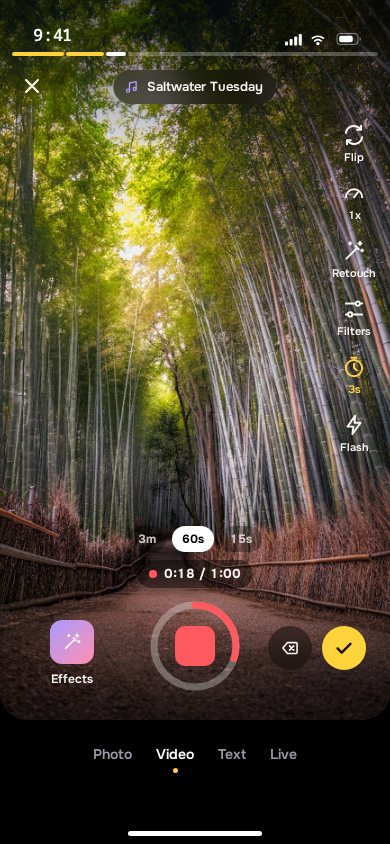
Flick is a complete short video app: welcome, picking interests and sign up, a For you feed and a Following feed, comments, a share sheet, discover with trends, search results, a hashtag, a sound, a creator page, the camera, the editor, posting and a posted screen, a live stream with gifts, an inbox and a chat, buying coins, creator analytics and earnings, a Flick Plus plan, your profile and settings. Ink black with sunflower yellow sparks and a soft lilac.
| Detail | Value |
|---|---|
| Screen type | Media |
| App | Flick: Short video feed |
| Category | Social |
| Design language | Dark-first, dark |
| Type | Bricolage Grotesque for headings, Onest for text |
| Colours | #0a0a0d background, #15151a surface, #f6f5f0 text, #9a99a6 text-muted, #ffd43b accent, #16130a accent-contrast, #a99bff secondary, #2a2a33 border, #ff5a5f danger |
What this screen says
- Saltwater Tuesday
- Flip
- Retouch
- Filters
- 3s
- Flash
- 3m 60s 15s
- Effects
- Photo Video Text Live
Around it in Flick
More player, camera and editor screens
- Ripple Now playing: Voice notes social
- Duo Our year: An app for two
- Soapbox Live round: Weekly debates and polls
- Murmur Photo: Chat rooms for art lovers
- Wink Intro video: Video first dating
- Snoot Story: Social app for pets
- Huddle Voice note: Interest groups and meetups
- Glade Story: Photo and clip social network
- Onair Live room: Live streaming
- Drift Reel: Reels and voice rooms
- Glitz Party room: Party live streaming
- Hearth Video call: Messenger for trips and circles
What makes a good media player screen
- Content takes the space. Artwork, video or the camera view should fill most of the screen.
- Primary controls in the thumb zone. Play and pause, the shutter or the main tool, large and low on the screen.
- Show progress and position. A scrubber with elapsed and remaining time, or the step in a lesson.
- Hide secondary controls until needed. Lyrics, queue, filters and advanced tools can live behind a tap or a swipe.
The full media player screen guide and every example
Remix Flick free: describe your own app and it is drawn in this design. Or get its files from $10: Figma, React Native, SwiftUI, Flutter and HTML.