Templates · List and feed screens · Social app · Commons
Commons Chat screen
A list screen from Commons, a social app template in a Minimal style. Screen 19 of 25.
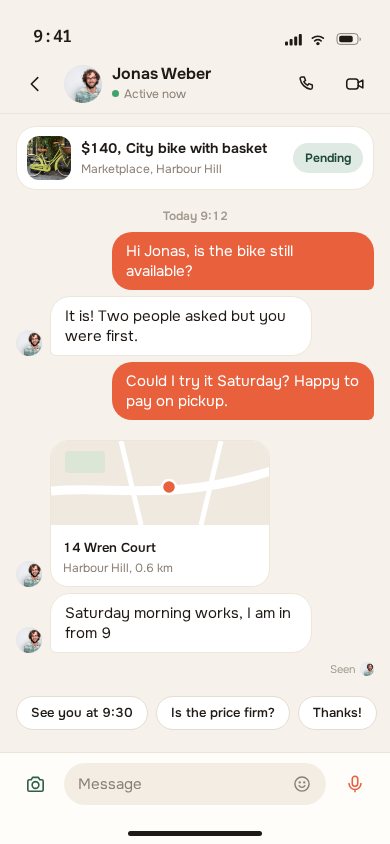
Commons is a complete everyday social app: welcome, find friends, sign in, a feed with today circles, posts with reactions and threaded comments, a composer, search, friend requests and birthdays, groups and a group page with admin insights, events with tickets, checkout and a ticket stub, a new event form, a neighbourhood marketplace with a listing and a seller chat, messages, memories, notifications, a Plus plan, profile and settings. Warm oat and white with persimmon, pine and butter.
| Detail | Value |
|---|---|
| Screen type | List |
| App | Commons: Friends, groups and events |
| Category | Social |
| Design language | Minimal, light |
| Type | Fraunces for headings, Onest for text |
| Colours | #f6f1ea background, #ffffff surface, #201a16 text, #8a7f75 text-muted, #e8603c accent, #ffffff accent-contrast, #2e5e4e secondary, #ebe3d8 border, #d0402e danger |
What this screen says
- Jonas Weber
- Active now
- $140, City bike with basket
- Marketplace, Harbour Hill
- Pending
- Today 9:12
- Hi Jonas, is the bike still available?
- It is! Two people asked but you were first.
- Could I try it Saturday? Happy to pay on pickup.
- 14 Wren CourtHarbour Hill, 0.6 km
- Saturday morning works, I am in from 9
- Seen
- See you at 9:30 Is the price firm? Thanks!
- Message
Around it in Commons
More list and feed screens
- Vista Comments: Photos, stories and reels
- Flick Following: Short video feed
- Squawk Topic: Short posts and live conversation
- Agora Comments: Communities, threads and votes
- Spark Likes: Swipe dating
- Candid Comments: One real photo a day
- Blink Chats: Camera chat and stories
- Cipher Note to self: Encrypted private messenger
- Tether History: Family location and safety
- Facet Circles: Video calls with family and friends
- Stoop Free stuff: Neighbourhood noticeboard
- Aura Circles: Moods with close friends
What makes a good list screen
- Show what people need to decide. Each row should carry just enough to choose: a title, one or two details and a status. Everything else belongs on the detail screen.
- Keep rows consistent. The same information in the same place on every row lets people scan down a column instead of reading each item.
- Group with headings. Dates, categories or status headings break long lists into chunks people can skip through.
- Make common actions quick. Swipe actions, a checkbox or a heart on the row save opening the item for small tasks.
The full list screen guide and every example
Remix Commons free: describe your own app and it is drawn in this design. Or get its files from $10: Figma, React Native, SwiftUI, Flutter and HTML.