Templates · Onboarding screens · Social app · Commons
Commons Find friends screen
An onboarding screen from Commons, a social app template in a Minimal style. Screen 2 of 25.
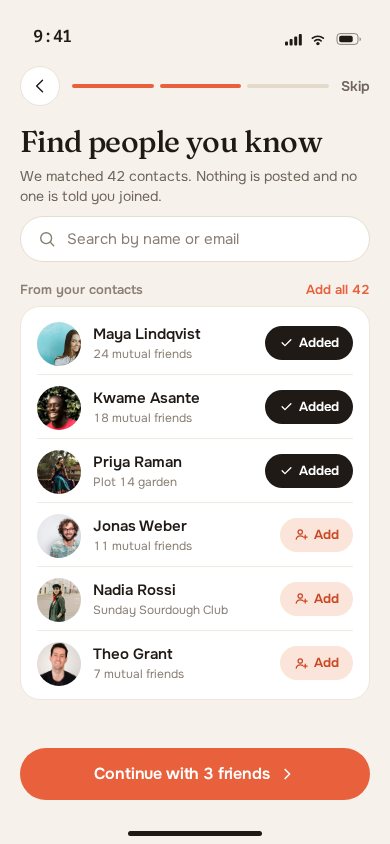
Commons is a complete everyday social app: welcome, find friends, sign in, a feed with today circles, posts with reactions and threaded comments, a composer, search, friend requests and birthdays, groups and a group page with admin insights, events with tickets, checkout and a ticket stub, a new event form, a neighbourhood marketplace with a listing and a seller chat, messages, memories, notifications, a Plus plan, profile and settings. Warm oat and white with persimmon, pine and butter.
| Detail | Value |
|---|---|
| Screen type | Onboarding |
| App | Commons: Friends, groups and events |
| Category | Social |
| Design language | Minimal, light |
| Type | Fraunces for headings, Onest for text |
| Colours | #f6f1ea background, #ffffff surface, #201a16 text, #8a7f75 text-muted, #e8603c accent, #ffffff accent-contrast, #2e5e4e secondary, #ebe3d8 border, #d0402e danger |
What this screen says
- Skip
- Find people you know
- We matched 42 contacts. Nothing is posted and no one is told you joined.
- Search by name or email
- From your contacts Add all 42
- Maya Lindqvist
- 24 mutual friends
- Added
- Kwame Asante
- 18 mutual friends
- Priya Raman
- Plot 14 garden
- Jonas Weber
- 11 mutual friends
- Add
- Nadia Rossi
- Sunday Sourdough Club
- Theo Grant
- 7 mutual friends
- Continue with 3 friends
Around it in Commons
More onboarding screens
- Quorum Welcome: Questions and expert answers
- Backer Welcome: Support creators with memberships
- Pledge Welcome: Back creative projects
- Civic Welcome: Report issues and city services
- Guild Welcome: Community servers with voice and text chat
- Parrot Welcome: Private messaging, groups and calls
- Carrier Welcome: Cloud messaging with channels
- Vista Welcome: Photos, stories and reels
- Flick Welcome: Short video feed
- Squawk Welcome: Short posts and live conversation
- Agora Welcome: Communities, threads and votes
- Spark Welcome: Swipe dating
Every social app onboarding screen
What makes a good onboarding screen
- One idea per screen. Each screen should say one thing in a headline people can read in a second. If a screen needs a paragraph, it is doing too much.
- Personalise with a purpose. Ask a question only if the answer changes what people see next, like a goal, a level or an interest. Then show that the answer mattered.
- Explain permissions before asking. Show your own screen saying why you need notifications, location or the camera before the system prompt. People who understand the reason are more likely to allow it.
- Let people skip. A visible skip or "I'll do this later" respects returning users and the impatient. Make sure skipping still lands them somewhere useful.
The full onboarding screen guide and every example
Remix Commons free: describe your own app and it is drawn in this design. Or get its files from $10: Figma, React Native, SwiftUI, Flutter and HTML.