Templates · Sign in and sign up screens · Social app · Commons
Commons Sign in screen
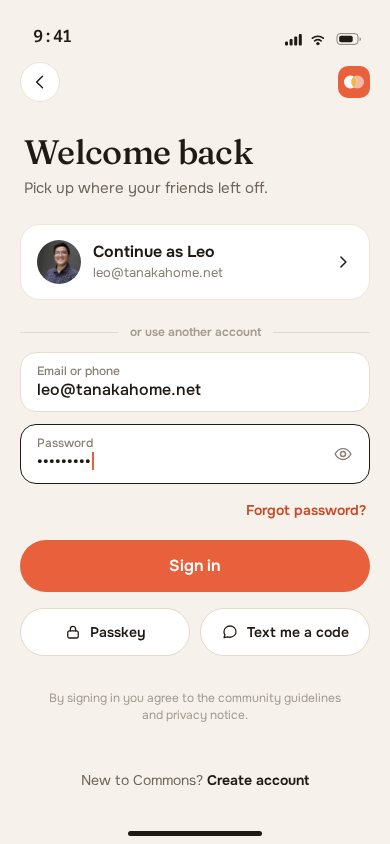
A sign in screen from Commons, a social app template in a Minimal style. Screen 3 of 25.
Commons is a complete everyday social app: welcome, find friends, sign in, a feed with today circles, posts with reactions and threaded comments, a composer, search, friend requests and birthdays, groups and a group page with admin insights, events with tickets, checkout and a ticket stub, a new event form, a neighbourhood marketplace with a listing and a seller chat, messages, memories, notifications, a Plus plan, profile and settings. Warm oat and white with persimmon, pine and butter.
| Detail | Value |
|---|---|
| Screen type | Sign in |
| App | Commons: Friends, groups and events |
| Category | Social |
| Design language | Minimal, light |
| Type | Fraunces for headings, Onest for text |
| Colours | #f6f1ea background, #ffffff surface, #201a16 text, #8a7f75 text-muted, #e8603c accent, #ffffff accent-contrast, #2e5e4e secondary, #ebe3d8 border, #d0402e danger |
What this screen says
- Welcome back
- Pick up where your friends left off.
- Continue as Leo
- leo@tanakahome.net
- or use another account
- Email or phone
- Password
- •••••••••
- Forgot password?
- Sign in
- Passkey
- Text me a code
- By signing in you agree to the community guidelines and privacy notice.
- New to Commons? Create account
Around it in Commons
More sign in and sign up screens
- Drift Sign in: Reels and voice rooms
- Glitz Sign in: Party live streaming
- Hearth Sign in: Messenger for trips and circles
- Chirp Sign in: Messenger with file sharing
- Banter Sign in: Live messenger
- Natter Sign in: Minimal messenger
- Nearly Sign in: Dating by crossed paths
- Linkup Sign in: Professional network and jobs
- Quorum Sign in: Questions and expert answers
- Backer Sign up: Support creators with memberships
- Pledge Sign in: Back creative projects
- Civic Sign in: Report issues and city services
Every social app sign in screen
What makes a good login screen
- Offer the fastest option first. Sign in with Apple, Google or a passkey takes one tap. If you support them, put them above the email form. Apple asks apps that use a third-party login like Google to also offer an equivalent privacy-focused option, such as Sign in with Apple.
- Separate sign in from sign up clearly. Use different headings and buttons, and a clear link to switch. People who already have an account should never end up creating a second one by accident.
- Use the right keyboard and autofill. Email fields should open the email keyboard and support password managers and one-time code autofill. Small details, big difference in how many people get through.
- Write errors that help. "That password doesn't match this email" is better than "Error 401". Keep what people typed so they only fix the part that was wrong.
The full login screen guide and every example
Remix Commons free: describe your own app and it is drawn in this design. Or get its files from $10: Figma, React Native, SwiftUI, Flutter and HTML.