Templates · List and feed screens · Education app · Classroom
Classroom Submissions screen
A list screen from Classroom, a class stream and assignments app template in a Minimal style. Screen 10 of 25.
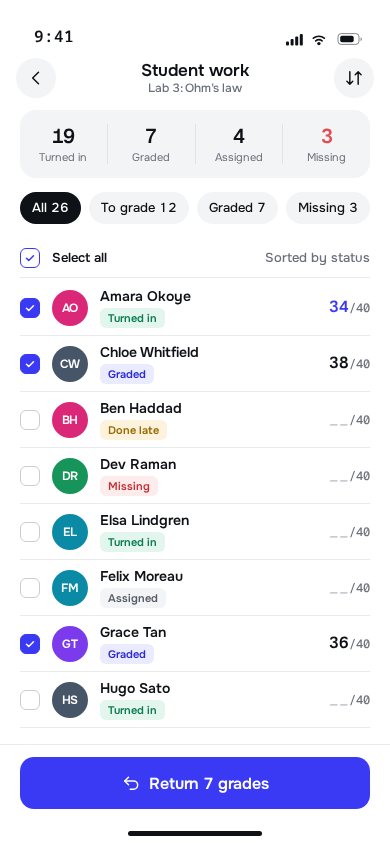
Classroom is a complete class stream and assignments app: welcome, sign in, a classes home with today's lessons and work to review, a class stream with announcements and comments, a new post, classwork by topic, an assignment with attachments and turn in counts, creating an assignment, a rubric builder, submissions, grading a lab report against the rubric, returning grades, private comments, people, a calendar of due work, a to do list, the student's own work with files, adding files, scanning notebook pages, turning in, class insights, activity, a Plus plan, profile and settings. White and soft grey with ultramarine, and tangerine, moss and teal for the other classes.
| Detail | Value |
|---|---|
| Screen type | List |
| App | Classroom: Class stream and assignments |
| Category | Education |
| Design language | Minimal, light |
| Type | Bricolage Grotesque for headings, Onest for text |
| Colours | #ffffff background, #f3f4f6 surface, #0e1116 text, #6a707b text-muted, #3a3af4 accent, #ffffff accent-contrast, #ff6b1a secondary, #e8eaee border, #e5484d danger |
What this screen says
- Student workLab 3: Ohm's law
- 19Turned in
- 7Graded
- 4Assigned
- 3Missing
- All 26 To grade 12 Graded 7 Missing 3
- Select all Sorted by status
- AO
- Amara OkoyeTurned in
- CW
- Chloe WhitfieldGraded
- BH
- Ben HaddadDone late
- __/40
- DR
- Dev RamanMissing
- EL
- Elsa LindgrenTurned in
- FM
- Felix MoreauAssigned
- GT
- Grace TanGraded
- HS
- Hugo SatoTurned in
- Return 7 grades
Around it in Classroom
More list and feed screens
- Zenith Planets: Night sky guide
- Chalk Category: Design courses
- Encore Notifications: Creator courses
- Studyhall Assigned: Free lessons and practice for school
- Tutor Reviews: Book online tutors for any skill
- Leaf Library: E-books and reading
- Almanac Contents: The free encyclopedia reader
- Tiles Archive: Daily word and number puzzles
- Stacks Loans: Borrow e-books and audiobooks from your library
- Penpal Chats: Language exchange chat
- Lexis In the wild: A word a day
- Quanta Lab notebook: Interactive physics lessons
Every education app list screen
What makes a good list screen
- Show what people need to decide. Each row should carry just enough to choose: a title, one or two details and a status. Everything else belongs on the detail screen.
- Keep rows consistent. The same information in the same place on every row lets people scan down a column instead of reading each item.
- Group with headings. Dates, categories or status headings break long lists into chunks people can skip through.
- Make common actions quick. Swipe actions, a checkbox or a heart on the row save opening the item for small tasks.
The full list screen guide and every example
Remix Classroom free: describe your own app and it is drawn in this design. Or get its files from $10: Figma, React Native, SwiftUI, Flutter and HTML.