Templates · List and feed screens · Education app · Zenith
Zenith Planets screen
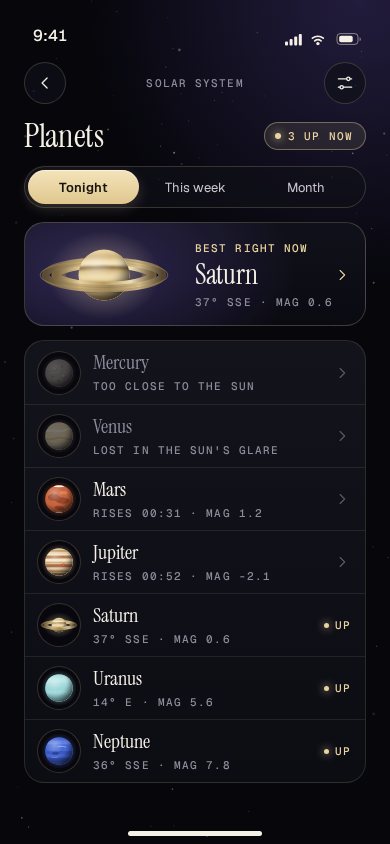
A list screen from Zenith, a night sky guide app template in a Dark-first style. Screen 7 of 25.
Zenith is a complete stargazing app: welcome, sign in, choosing an observing site, tonight's sky at a glance, a round sky map with a time ruler, search, planets and a planet page with an altitude curve, constellations and a constellation plate, a deep sky object, the moon, an events calendar and a meteor shower, the seeing forecast, a light pollution map, an observing log with a new entry and its confirmation, telescope tips with a step by step lesson, a Plus plan, notifications, profile and settings. Everything reads like an engraved star atlas lit in pale gold.
| Detail | Value |
|---|---|
| Screen type | List |
| App | Zenith: Night sky guide |
| Category | Education |
| Design language | Dark-first, dark |
| Type | Geist |
| Colours | #06060b background, #101018 surface, #f5f0e6 text, #8f8b9c text-muted, #e9d3a0 accent, #17130a accent-contrast, #9d8cf0 secondary, #2a2620 border, #f0766a danger |
What this screen says
- Solar system
- Planets
- 3 up now
- Tonight This week Month
- Best right now
- Saturn
- 37° SSE · Mag 0.6
- Mercury
- Too close to the sun
- Venus
- Lost in the sun's glare
- Mars
- Rises 00:31 · Mag 1.2
- Jupiter
- Rises 00:52 · Mag -2.1
- Up
- Uranus
- 14° E · Mag 5.6
- Neptune
- 36° SSE · Mag 7.8
Around it in Zenith
More list and feed screens
- Penpal Chats: Language exchange chat
- Lexis In the wild: A word a day
- Quanta Lab notebook: Interactive physics lessons
- Cram Subjects: Exam prep and mock tests
- Quad Week: University campus app
- Palm Course: Learn sign language
- Epoch Saved: History on a timeline
- Wren Phonics: Early reading for kids
- Proof Practice: Maths tutor that shows its working
- Skim Library: Speed reading trainer
- Terra Europe: Geography and flags quiz
- Gambit Lessons: Chess training
Every education app list screen
What makes a good list screen
- Show what people need to decide. Each row should carry just enough to choose: a title, one or two details and a status. Everything else belongs on the detail screen.
- Keep rows consistent. The same information in the same place on every row lets people scan down a column instead of reading each item.
- Group with headings. Dates, categories or status headings break long lists into chunks people can skip through.
- Make common actions quick. Swipe actions, a checkbox or a heart on the row save opening the item for small tasks.
The full list screen guide and every example
Remix Zenith free: describe your own app and it is drawn in this design. Or get its files from $10: Figma, React Native, SwiftUI, Flutter and HTML.