Templates · Detail screens · Education app · Classroom
Classroom Grade screen
A detail screen from Classroom, a class stream and assignments app template in a Minimal style. Screen 11 of 25.
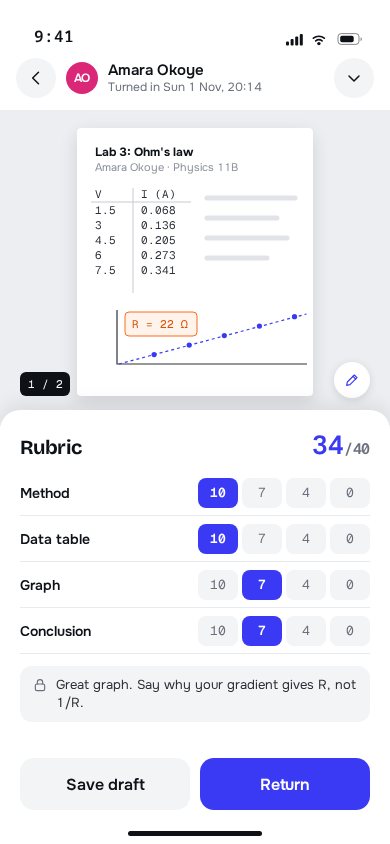
Classroom is a complete class stream and assignments app: welcome, sign in, a classes home with today's lessons and work to review, a class stream with announcements and comments, a new post, classwork by topic, an assignment with attachments and turn in counts, creating an assignment, a rubric builder, submissions, grading a lab report against the rubric, returning grades, private comments, people, a calendar of due work, a to do list, the student's own work with files, adding files, scanning notebook pages, turning in, class insights, activity, a Plus plan, profile and settings. White and soft grey with ultramarine, and tangerine, moss and teal for the other classes.
| Detail | Value |
|---|---|
| Screen type | Detail |
| App | Classroom: Class stream and assignments |
| Category | Education |
| Design language | Minimal, light |
| Type | Bricolage Grotesque for headings, Onest for text |
| Colours | #ffffff background, #f3f4f6 surface, #0e1116 text, #6a707b text-muted, #3a3af4 accent, #ffffff accent-contrast, #ff6b1a secondary, #e8eaee border, #e5484d danger |
What this screen says
- AO
- Amara OkoyeTurned in Sun 1 Nov, 20:14
- Rubric
- Method
- Data table
- Graph
- Conclusion
- Great graph. Say why your gradient gives R, not 1/R.
- Save draft
- Return
Around it in Classroom
More detail screens
- Zenith Saturn: Night sky guide
- Chalk Course: Design courses
- Encore Course: Creator courses
- Studyhall Course: Free lessons and practice for school
- Tutor profile: Book online tutors for any skill
- Leaf Dictionary: E-books and reading
- Almanac Article: The free encyclopedia reader
- Tiles How to play: Daily word and number puzzles
- Stacks Title: Borrow e-books and audiobooks from your library
- Penpal Chat: Language exchange chat
- Lexis Word: A word a day
- Quanta Mechanics: Interactive physics lessons
Every education app detail screen
What makes a good detail screen
- Lead with what identifies the item. A large image or title, the price or status, and the key facts at the top. People should know they are in the right place at a glance.
- Keep the main action visible. A sticky bottom button for Add to cart, Book or Play stays reachable while people scroll through details.
- Order information by importance. The facts that decide the choice come first; reviews, specifications and fine print further down.
- Use progressive disclosure. Long descriptions, specifications and policies can expand on tap rather than filling the screen.
The full detail screen guide and every example
Remix Classroom free: describe your own app and it is drawn in this design. Or get its files from $10: Figma, React Native, SwiftUI, Flutter and HTML.