Templates · List and feed screens · Productivity app · Chrono
Chrono Timers screen
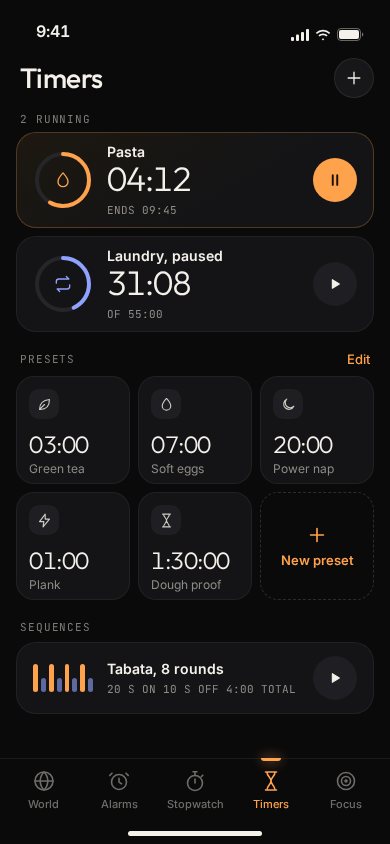
A list screen from Chrono, a productivity app template in a Dark-first style. Screen 16 of 25.
Chrono is a complete clock app: welcome, picking your cities, sign in, a world clock with a live dial and a daylight band for every city, city search and a city page with its sun arc, a meeting planner across zones with an invite and confirmation, alarms with an editor and a ringing screen, bedtime, a stopwatch with laps and lap splits, timers with presets, a new timer and a running ring, focus sessions, insights, widgets, notifications, a Pro plan, profile and settings. Obsidian black with sodium amber for day and periwinkle for night.
| Detail | Value |
|---|---|
| Screen type | List |
| App | Chrono: World clock, timers and stopwatch |
| Category | Productivity |
| Design language | Dark-first, dark |
| Type | Outfit for headings, Inter for text |
| Colours | #0a0a0b background, #141416 surface, #f4f1ea text, #8f8c86 text-muted, #ffa24c accent, #1c1105 accent-contrast, #8fa2ff secondary, #242427 border, #ff6250 danger |
What this screen says
- Timers
- 2 running
- Pasta
- 04:12ENDS 09:45
- Laundry, paused
- 31:08OF 55:00
- Presets Edit
- 03:00Green tea
- 07:00Soft eggs
- 20:00Power nap
- 01:00Plank
- 1:30:00Dough proof
- New preset
- Sequences
- Tabata, 8 rounds
- 20 S ON 10 S OFF 4:00 TOTAL
- World
- Alarms
- Stopwatch
- Focus
Around it in Chrono
More list and feed screens
- Bench Proposals: Freelance marketplace
- Convene Participants: Video meetings
- Unplug Schedules: Screen time blocker
- Streak Friends: Small days, long chains
- Deskly Rooms: Hybrid office booking
- Pomo Notifications: Focus timer
- Postbox Swipe actions: Email for busy teams
- Daybook Day: Calendar and planner
- Scanly Notifications: Document scanner
- Keyring Logins: Password manager
- Rota Notifications: Shift scheduling for hourly teams
- Inkwell Prompts: Daily journal
Every productivity app list screen
What makes a good list screen
- Show what people need to decide. Each row should carry just enough to choose: a title, one or two details and a status. Everything else belongs on the detail screen.
- Keep rows consistent. The same information in the same place on every row lets people scan down a column instead of reading each item.
- Group with headings. Dates, categories or status headings break long lists into chunks people can skip through.
- Make common actions quick. Swipe actions, a checkbox or a heart on the row save opening the item for small tasks.
The full list screen guide and every example
Remix Chrono free: describe your own app and it is drawn in this design. Or get its files from $10: Figma, React Native, SwiftUI, Flutter and HTML.