Templates · List and feed screens · Productivity app · Bench
Bench Proposals screen
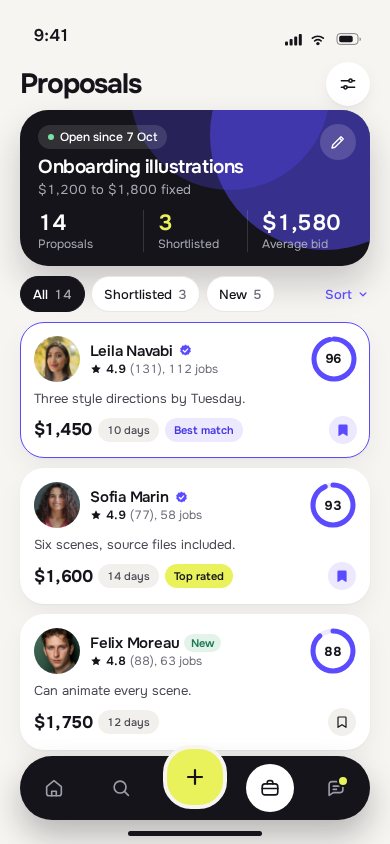
A list screen from Bench, a freelance marketplace app template in an Enterprise style. Screen 14 of 25.
Bench is a complete freelance marketplace for clients: onboarding, role choice and sign in, a home with the contract that needs attention and top rated talent, categories, search with filters, a freelancer profile with portfolio, packages and reviews, posting a job with budget and timeline, proposals ranked by match score, messages and chat, sending an offer, a contract with a milestone timeline and escrow, milestone review, funding escrow, payments, leaving a review, profile and settings. Off white and white with ink, violet and lemon.
| Detail | Value |
|---|---|
| Screen type | List |
| App | Bench: Freelance marketplace |
| Category | Productivity |
| Design language | Enterprise, light |
| Type | Onest |
| Colours | #f6f5f2 background, #ffffff surface, #14141a text, #6e6e7a text-muted, #5b4bff accent, #ffffff accent-contrast, #e9f25b secondary, #e8e6e0 border, #d9453d danger |
What this screen says
- Proposals
- Open since 7 Oct
- Onboarding illustrations
- $1,200 to $1,800 fixed
- 14Proposals
- 3Shortlisted
- $1,580Average bid
- All 14 Shortlisted 3 New 5 Sort
- Leila Navabi 4.9 (131), 112 jobs
- Three style directions by Tuesday.
- $1,450 10 days Best match
- Sofia Marin 4.9 (77), 58 jobs
- Six scenes, source files included.
- $1,600 14 days Top rated
- Felix MoreauNew 4.8 (88), 63 jobs
- Can animate every scene.
- $1,750 12 days
Around it in Bench
More list and feed screens
- Keyring Logins: Password manager
- Rota Notifications: Shift scheduling for hourly teams
- Inkwell Prompts: Daily journal
- Shortlist Notifications: Job search and application tracker
- Parley Add members: Team messenger
- Docket Notifications: Task and sprint planner
- Kanso Notifications: Tasks, calendar and chat
- Margin Notebooks: AI note taking
- Aide Notifications: Executive AI assistant
- Juno Models: AI chat assistant
- Opal Projects: Studio dashboard
- Jot Folders: Quick notes and checklists
Every productivity app list screen
What makes a good list screen
- Show what people need to decide. Each row should carry just enough to choose: a title, one or two details and a status. Everything else belongs on the detail screen.
- Keep rows consistent. The same information in the same place on every row lets people scan down a column instead of reading each item.
- Group with headings. Dates, categories or status headings break long lists into chunks people can skip through.
- Make common actions quick. Swipe actions, a checkbox or a heart on the row save opening the item for small tasks.
The full list screen guide and every example
Remix Bench free: describe your own app and it is drawn in this design. Or get its files from $10: Figma, React Native, SwiftUI, Flutter and HTML.