Templates · Paywall screens · Music app · Chorus
Chorus Pro screen
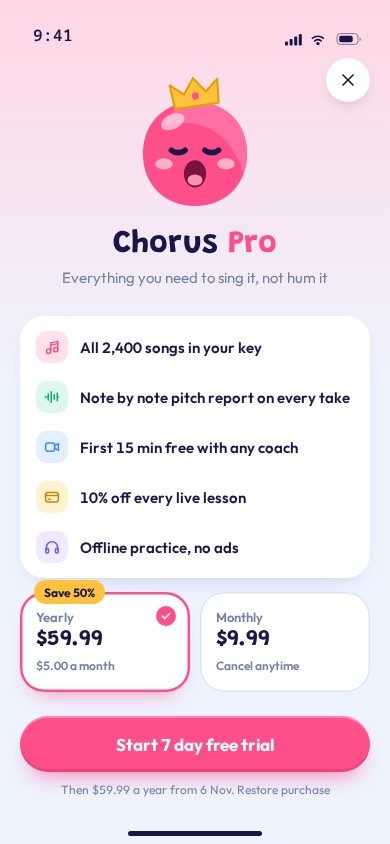
A paywall screen from Chorus, a singing lessons and pitch training app template in a Playful style. Screen 22 of 25.
Chorus is a complete singing coach in your pocket: welcome, a live range test that finds your voice type, sign up, a home with today's lesson, a course path, a lesson page, a lip trill warm-up, live pitch matching on a note lane, a lesson complete moment, a song library sorted by your range, a song page, karaoke sing along with a score, your recorded takes, an interval ear quiz, live coaches with booking, checkout and a booked screen, progress charts, a Pro plan, notifications, profile and settings. Every note has its own colour, from pink do to purple ti.
| Detail | Value |
|---|---|
| Screen type | Paywall |
| App | Chorus: Singing lessons and pitch training |
| Category | Music |
| Design language | Playful, light |
| Type | Grandstander for headings, Outfit for text |
| Colours | #eef4ff background, #ffffff surface, #1a1748 text, #7480a6 text-muted, #ff4f8b accent, #ffffff accent-contrast, #22c993 secondary, #dbe4f4 border, #ff8a3d danger |
What this screen says
- Chorus Pro
- Everything you need to sing it, not hum it
- All 2,400 songs in your key
- Note by note pitch report on every take
- First 15 min free with any coach
- 10% off every live lesson
- Offline practice, no ads
- Save 50% Yearly$59.99$5.00 a month
- Monthly$9.99Cancel anytime
- Start 7 day free trial
- Then $59.99 a year from 6 Nov. Restore purchase
Around it in Chorus
More paywall screens
- Groove Reserve: Vinyl collection and crate digging
- Crossfade Pro: DJ mixing on the go
- Fork Pro: Tuner and metronome
- Belt Plus: Karaoke nights
- Crowd Pass: Concert diary and setlists
- Dial Plus: Internet radio from everywhere
- Verse Pro: Songwriting notebook
- Masters Pro: Royalties and streams for artists
- Sonata Membership: Concert hall season and tickets
- Quire Plus: Sheet music and practice
- Wax Plus: Music streaming
- Earshot Plus: Podcast player
Every music app paywall screen
What makes a good paywall screen
- Lead with the outcome, not the feature list. The headline should say what changes for the person: "Train smarter every week" beats "Unlock Premium". Three to five benefits underneath are enough; more turns into a wall of ticks nobody reads.
- Show the real price, period and trial terms. State the price, how often it renews and when a free trial turns into a charge, near the button. Apple's App Store guideline 3.1.2 asks subscription apps to make this clear before purchase, and Google Play has similar rules.
- One primary button. The main call to action should be impossible to miss and say what happens: "Start 7-day free trial" or "Subscribe for $4.99/month". A second plan choice is fine; a second competing button is not.
- Make the plans easy to compare. When you offer monthly and yearly, show both prices in the same unit (per month or per week) and mark the saving on the yearly plan in plain numbers, not just a badge.
The full paywall screen guide and every example
Remix Chorus free: describe your own app and it is drawn in this design. Or get its files from $10: Figma, React Native, SwiftUI, Flutter and HTML.