Templates · List and feed screens · Music app · Chorus
Chorus Notifications screen
A list screen from Chorus, a singing lessons and pitch training app template in a Playful style. Screen 23 of 25.
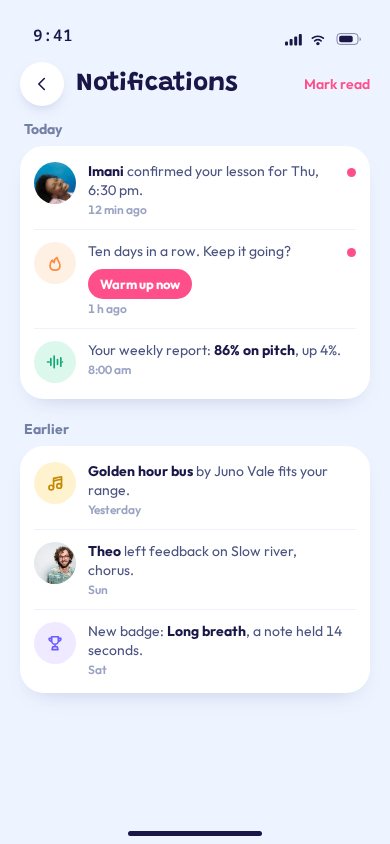
Chorus is a complete singing coach in your pocket: welcome, a live range test that finds your voice type, sign up, a home with today's lesson, a course path, a lesson page, a lip trill warm-up, live pitch matching on a note lane, a lesson complete moment, a song library sorted by your range, a song page, karaoke sing along with a score, your recorded takes, an interval ear quiz, live coaches with booking, checkout and a booked screen, progress charts, a Pro plan, notifications, profile and settings. Every note has its own colour, from pink do to purple ti.
| Detail | Value |
|---|---|
| Screen type | List |
| App | Chorus: Singing lessons and pitch training |
| Category | Music |
| Design language | Playful, light |
| Type | Grandstander for headings, Outfit for text |
| Colours | #eef4ff background, #ffffff surface, #1a1748 text, #7480a6 text-muted, #ff4f8b accent, #ffffff accent-contrast, #22c993 secondary, #dbe4f4 border, #ff8a3d danger |
What this screen says
- Notifications
- Mark read
- Today
- Imani confirmed your lesson for Thu, 6:30 pm.
- 12 min ago
- Ten days in a row. Keep it going?
- Warm up now 1 h ago
- Your weekly report: 86% on pitch, up 4%.
- 8:00 am
- Earlier
- Golden hour bus by Juno Vale fits your range.
- Yesterday
- Theo left feedback on Slow river, chorus.
- Sun
- New badge: Long breath, a note held 14 seconds.
- Sat
Around it in Chorus
More list and feed screens
- Aria Store: Audiobook library
- Hum Library: Song recognition
- Riff Stream: Upload and discover new tracks
- Groove Collection: Vinyl collection and crate digging
- Crossfade Library: DJ mixing on the go
- Fork Presets: Tuner and metronome
- Belt Clips: Karaoke nights
- Crowd Diary: Concert diary and setlists
- Dial City: Internet radio from everywhere
- Verse Songs: Songwriting notebook
- Masters Catalog: Royalties and streams for artists
- Sonata Season: Concert hall season and tickets
What makes a good list screen
- Show what people need to decide. Each row should carry just enough to choose: a title, one or two details and a status. Everything else belongs on the detail screen.
- Keep rows consistent. The same information in the same place on every row lets people scan down a column instead of reading each item.
- Group with headings. Dates, categories or status headings break long lists into chunks people can skip through.
- Make common actions quick. Swipe actions, a checkbox or a heart on the row save opening the item for small tasks.
The full list screen guide and every example
Remix Chorus free: describe your own app and it is drawn in this design. Or get its files from $10: Figma, React Native, SwiftUI, Flutter and HTML.