Templates · Paywall screens · Music app · Belt
Belt Plus screen
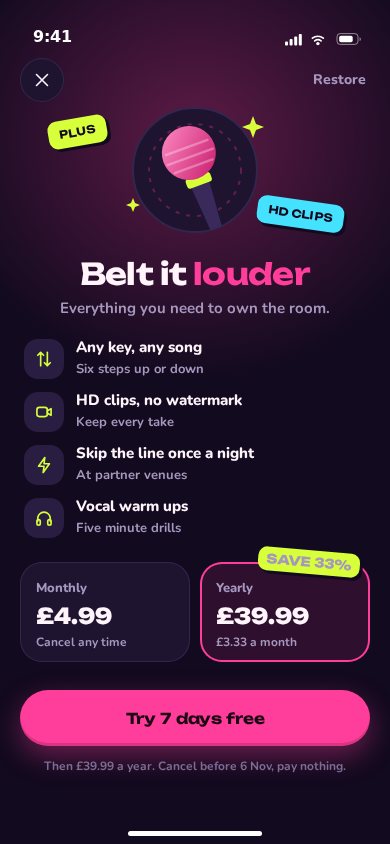
A paywall screen from Belt, a karaoke nights app template in a Gen Z style. Screen 23 of 25.
Belt is a complete karaoke nights app: welcome, your voice and sign in, a home with tonight's nights and the queue, a song library with search, song pages with key and difficulty, nights and venue pages, booking a private room with a split checkout and a booked pass, the live queue, requesting a song with a key shift and a duet partner, a now singing screen with wiping lyrics and a pitch ribbon, your score, clips and a clip player, setlists, your crew, a leaderboard, vocal stats, notifications, Belt Plus, profile and settings. Grape black, bubblegum pink and acid lime.
| Detail | Value |
|---|---|
| Screen type | Paywall |
| App | Belt: Karaoke nights |
| Category | Music |
| Design language | Gen Z, dark |
| Type | Unbounded for headings, Nunito for text |
| Colours | #120a1f background, #1e1430 surface, #fff4fa text, #a597bd text-muted, #ff3d9a accent, #1c0614 accent-contrast, #d7ff3a secondary, #33264d border, #ff6150 danger |
What this screen says
- Restore
- Plus HD clips
- Belt it louder
- Everything you need to own the room.
- Any key, any songSix steps up or down
- HD clips, no watermarkKeep every take
- Skip the line once a nightAt partner venues
- Vocal warm upsFive minute drills
- Monthly £4.99Cancel any time
- Save 33% Yearly £39.99£3.33 a month
- Try 7 days free
- Then £39.99 a year. Cancel before 6 Nov, pay nothing.
Around it in Belt
More paywall screens
- Padd Pro: Beat maker
- Aria Membership: Audiobook library
- Hum Plus: Song recognition
- Riff Plus: Upload and discover new tracks
- Groove Reserve: Vinyl collection and crate digging
- Crossfade Pro: DJ mixing on the go
- Fork Pro: Tuner and metronome
- Crowd Pass: Concert diary and setlists
- Dial Plus: Internet radio from everywhere
- Chorus Pro: Singing lessons and pitch training
- Verse Pro: Songwriting notebook
- Masters Pro: Royalties and streams for artists
Every music app paywall screen
What makes a good paywall screen
- Lead with the outcome, not the feature list. The headline should say what changes for the person: "Train smarter every week" beats "Unlock Premium". Three to five benefits underneath are enough; more turns into a wall of ticks nobody reads.
- Show the real price, period and trial terms. State the price, how often it renews and when a free trial turns into a charge, near the button. Apple's App Store guideline 3.1.2 asks subscription apps to make this clear before purchase, and Google Play has similar rules.
- One primary button. The main call to action should be impossible to miss and say what happens: "Start 7-day free trial" or "Subscribe for $4.99/month". A second plan choice is fine; a second competing button is not.
- Make the plans easy to compare. When you offer monthly and yearly, show both prices in the same unit (per month or per week) and mark the saving on the yearly plan in plain numbers, not just a badge.
The full paywall screen guide and every example
Remix Belt free: describe your own app and it is drawn in this design. Or get its files from $10: Figma, React Native, SwiftUI, Flutter and HTML.