Templates · Paywall screens · Music app · Verse
Verse Pro screen
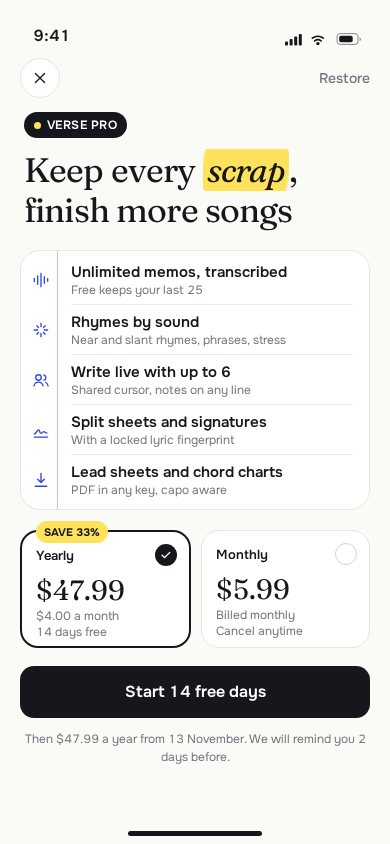
A paywall screen from Verse, a songwriting notebook app template in a Minimal style. Screen 22 of 25.
Verse is a complete songwriting notebook: welcome, setup and sign in, a notebook home with today's prompt and songs in progress, a song library, a song page, a lyric editor with chords, syllable counts and rhyme letters, a rhyme finder, a chord progression builder, song structure, voice memo recording and playback with a transcript, ideas and quick capture, search, writing stats, co-writing with a split sheet and its signed confirmation, a Pro plan, activity, profile and settings. Paper white and ink with ballpoint blue and highlighter yellow.
| Detail | Value |
|---|---|
| Screen type | Paywall |
| App | Verse: Songwriting notebook |
| Category | Music |
| Design language | Minimal, light |
| Type | Fraunces for headings, Onest for text |
| Colours | #fafaf7 background, #ffffff surface, #16171d text, #74767f text-muted, #2f45e0 accent, #ffffff accent-contrast, #ffe25c secondary, #e6e5df border, #ff5a45 danger |
What this screen says
- Restore
- VERSE PRO
- Keep every scrap, finish more songs
- Unlimited memos, transcribed
- Free keeps your last 25
- Rhymes by sound
- Near and slant rhymes, phrases, stress
- Write live with up to 6
- Shared cursor, notes on any line
- Split sheets and signatures
- With a locked lyric fingerprint
- Lead sheets and chord charts
- PDF in any key, capo aware
- SAVE 33%
- Yearly
- $4.00 a month
- 14 days free
- Monthly
- Billed monthly
- Cancel anytime
- Start 14 free days
- Then $47.99 a year from 13 November. We will remind you 2 days before.
Around it in Verse
More paywall screens
- Belt Plus: Karaoke nights
- Crowd Pass: Concert diary and setlists
- Dial Plus: Internet radio from everywhere
- Chorus Pro: Singing lessons and pitch training
- Masters Pro: Royalties and streams for artists
- Sonata Membership: Concert hall season and tickets
- Quire Plus: Sheet music and practice
- Wax Plus: Music streaming
- Earshot Plus: Podcast player
- Strum Plus: Learn guitar, one chord at a time
- Gigly Plus: Gig and festival tickets
- Padd Pro: Beat maker
Every music app paywall screen
What makes a good paywall screen
- Lead with the outcome, not the feature list. The headline should say what changes for the person: "Train smarter every week" beats "Unlock Premium". Three to five benefits underneath are enough; more turns into a wall of ticks nobody reads.
- Show the real price, period and trial terms. State the price, how often it renews and when a free trial turns into a charge, near the button. Apple's App Store guideline 3.1.2 asks subscription apps to make this clear before purchase, and Google Play has similar rules.
- One primary button. The main call to action should be impossible to miss and say what happens: "Start 7-day free trial" or "Subscribe for $4.99/month". A second plan choice is fine; a second competing button is not.
- Make the plans easy to compare. When you offer monthly and yearly, show both prices in the same unit (per month or per week) and mark the saving on the yearly plan in plain numbers, not just a badge.
The full paywall screen guide and every example
Remix Verse free: describe your own app and it is drawn in this design. Or get its files from $10: Figma, React Native, SwiftUI, Flutter and HTML.