Templates · Paywall screens · Smart home app · Chime
Chime Plus screen
A paywall screen from Chime, a voice assistant and smart speaker app template in a Glass style. Screen 22 of 25.
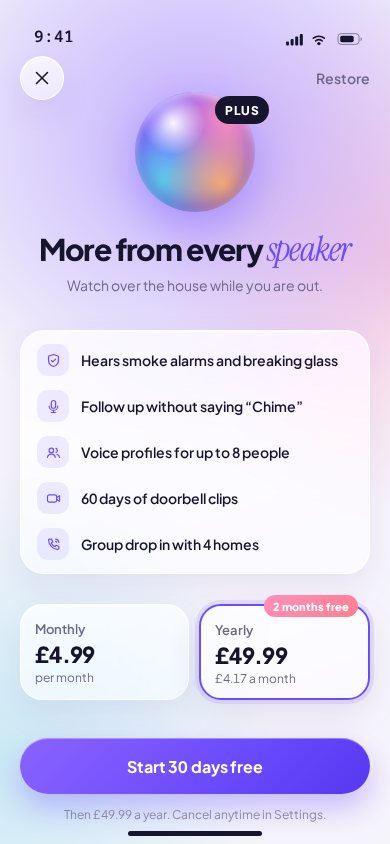
Chime is a complete voice assistant and smart speaker app: welcome, sign in and speaker setup, a home with the listening orb, now playing, a running timer and favourite devices, a live listening screen with transcript, an answer thread with a weather card and reminder, devices grouped by room, a living room with scenes and a thermostat dial, a light with a brightness capsule, routines with a builder and a success screen, timers and alarms, a shared shopping list, drop in, announcements, music on a speaker group, a skills directory, voice history with privacy controls, weekly activity, a Plus plan, notifications, a household profile and settings. Pearly lilac glass with an iridescent violet orb.
| Detail | Value |
|---|---|
| Screen type | Paywall |
| App | Chime: Voice assistant and smart speaker |
| Category | Smart home |
| Design language | Glass, light |
| Type | Instrument Serif for headings, Plus Jakarta Sans for text |
| Colours | #f6f4fb background, #ffffff surface, #17142e text, #6d6889 text-muted, #6c4cff accent, #ffffff accent-contrast, #ff8fb8 secondary, #e6e2f2 border, #f0466e danger |
What this screen says
- Restore
- PLUS
- More from every speaker
- Watch over the house while you are out.
- Hears smoke alarms and breaking glass
- Follow up without saying “Chime”
- Voice profiles for up to 8 people
- 60 days of doorbell clips
- Group drop in with 4 homes
- Monthly
- per month
- 2 months freeYearly
- £4.17 a month
- Start 30 days free
- Then £49.99 a year. Cancel anytime in Settings.
Around it in Chime
More paywall screens
- Meter Compare tariffs: Your energy supplier account
- Couch Plus: TV remote, casting and watchlist
- Latch Plus: Smart locks and guest access
- Mesh Shield: Home Wi-Fi network
- Decibel Plus: Multi-room speakers
- Nursery Plus: Baby monitor camera and sleep
- Porch Plus: Home security cameras
- Sundial Plus: Solar panels and home battery
- Puddle Plus: Garden watering and sprinklers
- Upkeep Plus: Home maintenance calendar
- Kelvin Reserve: Climate and thermostat
- Glow+: Light scenes and colour
Every smart home app paywall screen
What makes a good paywall screen
- Lead with the outcome, not the feature list. The headline should say what changes for the person: "Train smarter every week" beats "Unlock Premium". Three to five benefits underneath are enough; more turns into a wall of ticks nobody reads.
- Show the real price, period and trial terms. State the price, how often it renews and when a free trial turns into a charge, near the button. Apple's App Store guideline 3.1.2 asks subscription apps to make this clear before purchase, and Google Play has similar rules.
- One primary button. The main call to action should be impossible to miss and say what happens: "Start 7-day free trial" or "Subscribe for $4.99/month". A second plan choice is fine; a second competing button is not.
- Make the plans easy to compare. When you offer monthly and yearly, show both prices in the same unit (per month or per week) and mark the saving on the yearly plan in plain numbers, not just a badge.
The full paywall screen guide and every example
Remix Chime free: describe your own app and it is drawn in this design. Or get its files from $10: Figma, React Native, SwiftUI, Flutter and HTML.