Templates · Paywall screens · Smart home app · Latch
Latch Plus screen
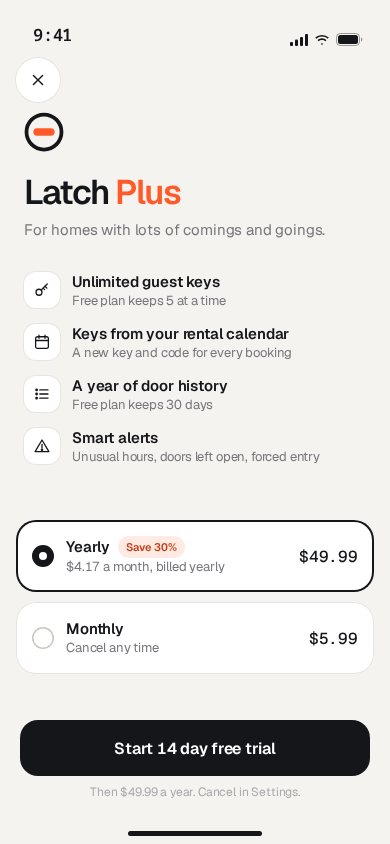
A paywall screen from Latch, a smart locks and guest access app template in a Minimal style. Screen 22 of 25.
Latch is a complete smart lock app: welcome, sign in, a home with a big lock dial, door details, a live auto-lock countdown, every door across two homes, a door activity log with entry details, guest keys with schedules, an access window picker, review and a sent key, keypad codes with a number pad, auto-lock and auto-unlock, lock health insights, adding and calibrating a lock, a plan, notifications, account and settings. Porcelain and white with ink, one vermilion for unlocked and a calm green for locked.
| Detail | Value |
|---|---|
| Screen type | Paywall |
| App | Latch: Smart locks and guest access |
| Category | Smart home |
| Design language | Minimal, light |
| Type | Geist Mono for headings, Geist for text |
| Colours | #f4f3ef background, #ffffff surface, #141619 text, #76777b text-muted, #ff5a28 accent, #ffebe3 accent-soft, #1d9a66 success, #d98a00 warning, #e7e5df border |
What this screen says
- Latch Plus
- For homes with lots of comings and goings.
- Unlimited guest keys
- Free plan keeps 5 at a time
- Keys from your rental calendar
- A new key and code for every booking
- A year of door history
- Free plan keeps 30 days
- Smart alerts
- Unusual hours, doors left open, forced entry
- Yearly Save 30%
- $4.17 a month, billed yearly
- Monthly
- Cancel any time
- Start 14 day free trial
- Then $49.99 a year. Cancel in Settings.
Around it in Latch
More paywall screens
- Puddle Plus: Garden watering and sprinklers
- Upkeep Plus: Home maintenance calendar
- Kelvin Reserve: Climate and thermostat
- Glow+: Light scenes and colour
- Tagged Plus: Home inventory for insurance
- Lobby Plus: Apartment building app
- Sweep Plus: Robot vacuum and mop
- Dusk Plus: Smart home scenarios
- Lumen Plus: Smart home energy
- Abode Plus: Smart home devices
- Boxed Plus: Book movers and plan moving day
- Meter Compare tariffs: Your energy supplier account
Every smart home app paywall screen
What makes a good paywall screen
- Lead with the outcome, not the feature list. The headline should say what changes for the person: "Train smarter every week" beats "Unlock Premium". Three to five benefits underneath are enough; more turns into a wall of ticks nobody reads.
- Show the real price, period and trial terms. State the price, how often it renews and when a free trial turns into a charge, near the button. Apple's App Store guideline 3.1.2 asks subscription apps to make this clear before purchase, and Google Play has similar rules.
- One primary button. The main call to action should be impossible to miss and say what happens: "Start 7-day free trial" or "Subscribe for $4.99/month". A second plan choice is fine; a second competing button is not.
- Make the plans easy to compare. When you offer monthly and yearly, show both prices in the same unit (per month or per week) and mark the saving on the yearly plan in plain numbers, not just a badge.
The full paywall screen guide and every example
Remix Latch free: describe your own app and it is drawn in this design. Or get its files from $10: Figma, React Native, SwiftUI, Flutter and HTML.