Templates · Paywall screens · Smart home app · Kelvin
Kelvin Reserve screen
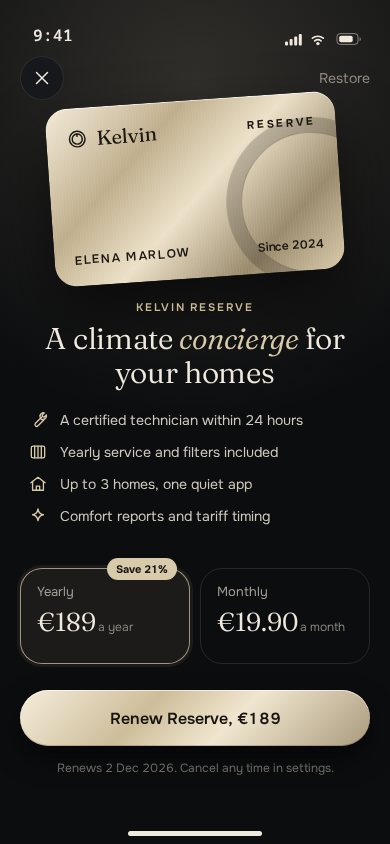
A paywall screen from Kelvin, a climate and thermostat app template in a Luxury style. Screen 23 of 25.
Kelvin is a complete luxury climate app: welcome, pairing a dial, sign in, a home with the living room dial, rooms, a room control with heat, cool and auto, the wine cellar, scenes, a weekday schedule and period editor, the forecast plan, live arrival preheating, away mode, air quality, history, energy, devices, the heat pump, a service booking with confirmation, alerts, a Reserve membership, profile and settings. Obsidian and ivory with champagne metal and a glacier to ember temperature scale.
| Detail | Value |
|---|---|
| Screen type | Paywall |
| App | Kelvin: Climate and thermostat |
| Category | Smart home |
| Design language | Luxury, dark |
| Type | Fraunces for headings, Onest for text |
| Colours | #0c0d0f background, #16181b surface, #efe9de text, #8f8b83 text-muted, #d8cbab accent, #17140f accent-contrast, #f0895a secondary, #26282c border, #e5675c danger |
What this screen says
- Restore
- Kelvin
- RESERVE ELENA MARLOW Since 2024
- Kelvin Reserve
- A climate concierge for your homes
- A certified technician within 24 hours
- Yearly service and filters included
- Up to 3 homes, one quiet app
- Comfort reports and tariff timing
- Save 21%Yearly €189a year
- Monthly €19.90a month
- Renew Reserve, €189
- Renews 2 Dec 2026. Cancel any time in settings.
Around it in Kelvin
More paywall screens
- Puddle Plus: Garden watering and sprinklers
- Upkeep Plus: Home maintenance calendar
- Glow+: Light scenes and colour
- Tagged Plus: Home inventory for insurance
- Lobby Plus: Apartment building app
- Sweep Plus: Robot vacuum and mop
- Dusk Plus: Smart home scenarios
- Lumen Plus: Smart home energy
- Abode Plus: Smart home devices
- Boxed Plus: Book movers and plan moving day
- Meter Compare tariffs: Your energy supplier account
- Couch Plus: TV remote, casting and watchlist
Every smart home app paywall screen
What makes a good paywall screen
- Lead with the outcome, not the feature list. The headline should say what changes for the person: "Train smarter every week" beats "Unlock Premium". Three to five benefits underneath are enough; more turns into a wall of ticks nobody reads.
- Show the real price, period and trial terms. State the price, how often it renews and when a free trial turns into a charge, near the button. Apple's App Store guideline 3.1.2 asks subscription apps to make this clear before purchase, and Google Play has similar rules.
- One primary button. The main call to action should be impossible to miss and say what happens: "Start 7-day free trial" or "Subscribe for $4.99/month". A second plan choice is fine; a second competing button is not.
- Make the plans easy to compare. When you offer monthly and yearly, show both prices in the same unit (per month or per week) and mark the saving on the yearly plan in plain numbers, not just a badge.
The full paywall screen guide and every example
Remix Kelvin free: describe your own app and it is drawn in this design. Or get its files from $10: Figma, React Native, SwiftUI, Flutter and HTML.