Templates · Form and input screens · Fitness app · Careline
Careline Check in screen
A form screen from Careline, a care for an ageing parent app template in a Clinical style. Screen 15 of 25.
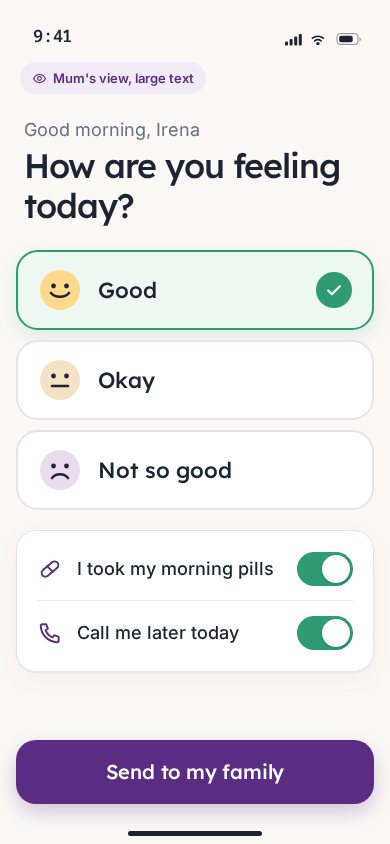
Careline is a complete family care circle app: welcome, sign in, a today screen with Mum's morning check in, a shared care calendar with open slots, task detail and sign up, new tasks, a medication schedule and refills, appointments with questions to ask, a live ride, an updates journal with comments, a big button check in for the parent, booking a paid home helper with a split cost, a document vault, the family chat, a monthly summary, a plus plan, notifications, the parent's profile with her circle, and settings. Porcelain and white with deep plum, a calm green for covered and a soft rose for help needed.
| Detail | Value |
|---|---|
| Screen type | Form |
| App | Careline: Care for an ageing parent |
| Category | Health and fitness |
| Design language | Clinical, light |
| Type | Lexend for headings, Inter for text |
| Colours | #f6f4f1 background, #ffffff surface, #1e2233 text, #6b6f80 text-muted, #5a2d82 accent, #f1ebf8 primary-tint, #2e9b74 success, #d94f70 attention, #f2b25c warm-accent, #e7e2ea border |
What this screen says
- Mum's view, large text
- Good morning, Irena
- How are you feeling today?
- Good
- Okay
- Not so good
- I took my morning pills
- Call me later today
- Send to my family
Around it in Careline
More form and input screens
- Flexpass Filters: One membership, many studios
- Clinic Filters: Find and book doctors
- Velo Your goals: Live and on-demand indoor cycling
- Vantage Edit my day: Sports watch companion
- Labwork Collection: Book blood tests and see results
- Segment Save activity: Runs and rides with friends
- Nightly Add tags: Smart ring sleep and readiness
- Pillbox Add medicine: Pharmacy refills and medicine reminders
- Rise Set alarm: Alarm clock and sleep cycles
- Ward Check in: Patient portal for results, visits and messages
- Level Target range: Glucose monitor companion
- Reformer Rate class: Pilates studio booking
What makes a good form screen
- Ask only what you need. Every field is a reason to stop. Remove optional fields or move them to later.
- Labels above fields. Visible labels stay readable while people type; placeholder-only labels disappear.
- Use the right keyboard and input. Number pads for amounts, email keyboards for email, pickers for dates and autofill for addresses and codes.
- Validate as people go. Show problems next to the field when people leave it, in words that say how to fix them.
The full form screen guide and every example
Remix Careline free: describe your own app and it is drawn in this design. Or get its files from $10: Figma, React Native, SwiftUI, Flutter and HTML.