Templates · List and feed screens · Productivity app · Canvas
Canvas Activity screen
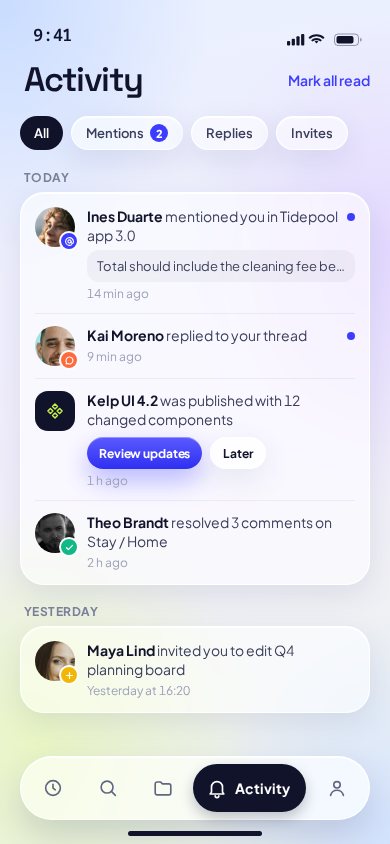
A list screen from Canvas, a productivity app template in a Glass style. Screen 20 of 25.
Canvas is a complete design file companion: welcome and sign in, recent files with who is editing live, search across files, frames and components, team projects, a file on a dotted canvas with multiplayer cursors, pages and layers, inspect with sizes, colours and code, a prototype player, live mirror that follows a teammate, comment threads with pins, mentions and resolve, sharing and permissions, version history, a whiteboard, a component library, team insights, activity, a plan upgrade with checkout and a confirmation, profile and settings. Frosted glass on an ice blue and lilac haze with ultramarine and a lime spark.
| Detail | Value |
|---|---|
| Screen type | List |
| App | Canvas: Design files and comments on mobile |
| Category | Productivity |
| Design language | Glass, light |
| Type | Space Grotesk for headings, Plus Jakarta Sans for text |
| Colours | #eef1f8 background, #ffffff surface, #11132a text, #626780 text-muted, #3d3dff accent, #ffffff accent-contrast, #c6f24e secondary, #e2e5f1 border, #ff4d5e danger |
What this screen says
- Activity
- Mark all read
- All
- Mentions 2
- Replies
- Invites
- TODAY
- Ines Duarte mentioned you in Tidepool app 3.0
- Total should include the cleaning fee before tax…14 min ago
- Kai Moreno replied to your thread
- 9 min ago
- Kelp UI 4.2 was published with 12 changed components
- Review updates Later
- 1 h ago
- Theo Brandt resolved 3 comments on Stay / Home
- 2 h ago
- YESTERDAY
- Maya Lind invited you to edit Q4 planning board
- Yesterday at 16:20
Around it in Canvas
More list and feed screens
- Easel Templates: Collaborative whiteboard
- Token Requests: Two-factor codes and sign-in approvals
- Beam Transfers: Send big files
- Parchment Files: Documents, edit and share
- Lectern New deck: Slides and presenter remote
- Ringer Recents: Phone, contacts and voicemail
- Pipeline: Sales CRM on the road
- Aim Objectives: Goals and key results
- Scribe Action items: Voice memos to notes
- Inkline Inbox: Sign and send contracts
- Dispatch Jobs: Field service jobs for technicians
- Stash Library: Read-it-later and highlights
Every productivity app list screen
What makes a good list screen
- Show what people need to decide. Each row should carry just enough to choose: a title, one or two details and a status. Everything else belongs on the detail screen.
- Keep rows consistent. The same information in the same place on every row lets people scan down a column instead of reading each item.
- Group with headings. Dates, categories or status headings break long lists into chunks people can skip through.
- Make common actions quick. Swipe actions, a checkbox or a heart on the row save opening the item for small tasks.
The full list screen guide and every example
Remix Canvas free: describe your own app and it is drawn in this design. Or get its files from $10: Figma, React Native, SwiftUI, Flutter and HTML.