Templates · Onboarding screens · Sports app · Canter
Canter Your riding screen
An onboarding screen from Canter, a riding stables and lessons app template in a Luxury style. Screen 2 of 25.
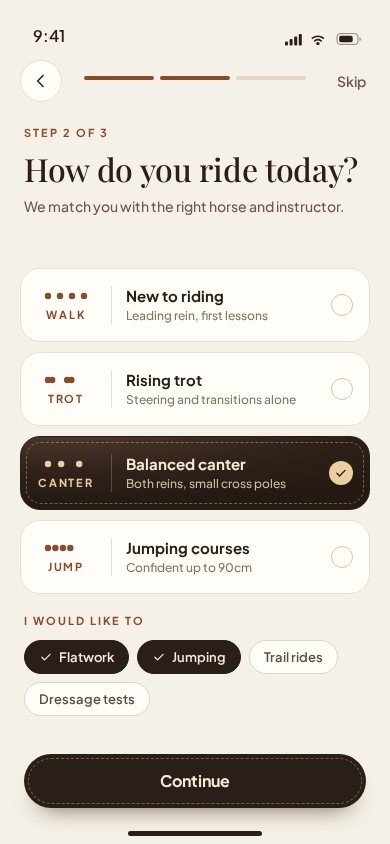
Canter is a complete riding stables app: welcome, rider level and sign in, a home with the next lesson on a stitched leather card, lessons to book, instructors, the stable of horses and a horse profile, a month calendar with time slots, review, payment and a rosette confirmation, a lesson plan drawn on a dressage arena, a live ride with gait tracking, ride summaries, progress, a ride journal and log form, a trail ride, video review, shows and results, membership, notifications, profile and settings. Linen and espresso leather with cognac, brass and rosette blue.
| Detail | Value |
|---|---|
| Screen type | Onboarding |
| App | Canter: Riding stables and lessons |
| Category | Sports |
| Design language | Luxury, light |
| Type | Playfair Display for headings, Plus Jakarta Sans for text |
| Colours | #f6f1e8 background, #fffdf8 surface, #2a1e18 text, #857567 text-muted, #8a4b2a accent, #f6ead6 accent-contrast, #2c4a8c secondary, #e8dfd0 border, #a3322b danger |
What this screen says
- Skip
- Step 2 of 3
- How do you ride today?
- We match you with the right horse and instructor.
- walk
- New to ridingLeading rein, first lessons
- trot
- Rising trotSteering and transitions alone
- canter
- Balanced canterBoth reins, small cross poles
- jump
- Jumping coursesConfident up to 90cm
- I would like to
- Flatwork Jumping Trail rides Dressage tests
- Continue
Around it in Canter
More onboarding screens
- Cairn Welcome: Trails, contours and summits on one map sheet
- Lapse Welcome: Swim training
- Angler Welcome: A fishing log drawn on the depth chart
- Piste Welcome: Ski resort companion
- Crag Welcome: Climbing gym logbook
- Fairway Welcome: Golf course guide and scorecard
- Matchday Welcome: Football scores and fantasy
- Rally Welcome: Tennis and padel club
- Swell Welcome: Surf forecast
- Pitwall Welcome: Race engineering
- Elevens Welcome: Fantasy cricket leagues
- Scoreboard Welcome: Scores and news for every sport
Every sports app onboarding screen
What makes a good onboarding screen
- One idea per screen. Each screen should say one thing in a headline people can read in a second. If a screen needs a paragraph, it is doing too much.
- Personalise with a purpose. Ask a question only if the answer changes what people see next, like a goal, a level or an interest. Then show that the answer mattered.
- Explain permissions before asking. Show your own screen saying why you need notifications, location or the camera before the system prompt. People who understand the reason are more likely to allow it.
- Let people skip. A visible skip or "I'll do this later" respects returning users and the impatient. Make sure skipping still lands them somewhere useful.
The full onboarding screen guide and every example
Remix Canter free: describe your own app and it is drawn in this design. Or get its files from $10: Figma, React Native, SwiftUI, Flutter and HTML.