Templates · Form and input screens · Productivity app · Pipeline
Pipeline Check in screen
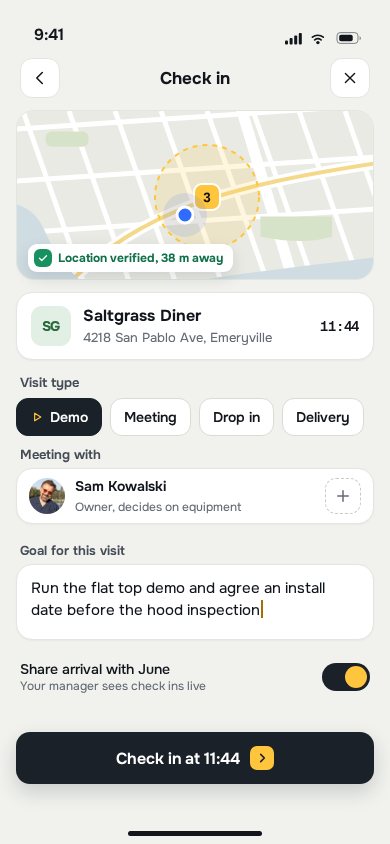
A form screen from Pipeline, a sales CRM on the road app template in an Enterprise style. Screen 5 of 25.
Pipeline is a complete field sales CRM: welcome and sign in, a Today screen with the next stop and quota, a live route map, check in on arrival, a stage board pipeline, deal, account and contact pages, search and a map of nearby accounts, visit logging with a voice note and a business card scanner, a new deal form, a quote with on device sign off and a deal won screen, a forecast dashboard, activity, tasks, notifications, a Pro plan, profile and settings. Stone grey and white with asphalt and marigold.
| Detail | Value |
|---|---|
| Screen type | Form |
| App | Pipeline: Sales CRM on the road |
| Category | Productivity |
| Design language | Enterprise, light |
| Type | Onest |
| Colours | #f1f2ee background, #ffffff surface, #12161c text, #646b75 text-muted, #ffc53d accent, #12161c accent-contrast, #1b2128 secondary, #e3e5df border, #d9453b danger |
What this screen says
- Check in
- Location verified, 38 m away
- SG
- Saltgrass Diner
- 4218 San Pablo Ave, Emeryville
- Visit type
- Demo Meeting Drop in Delivery
- Meeting with
- Sam Kowalski
- Owner, decides on equipment
- Goal for this visit
- Run the flat top demo and agree an install date before the hood inspection
- Share arrival with JuneYour manager sees check ins live
- Check in at 11:44
Around it in Pipeline
More form and input screens
- Docket New task: Task and sprint planner
- Kanso New task: Tasks, calendar and chat
- Margin Edit note: AI note taking
- Aide Command: Executive AI assistant
- Juno New chat: AI chat assistant
- Opal New task: Studio dashboard
- Jot Format: Quick notes and checklists
- Chrono Planner: World clock, timers and stopwatch
- Frontdesk Reply: Customer support inbox
- Campaign New campaign: Email marketing campaigns
- Outpost Compose: Schedule social posts
- Pageview Compare: Website analytics
Every productivity app form screen
What makes a good form screen
- Ask only what you need. Every field is a reason to stop. Remove optional fields or move them to later.
- Labels above fields. Visible labels stay readable while people type; placeholder-only labels disappear.
- Use the right keyboard and input. Number pads for amounts, email keyboards for email, pickers for dates and autofill for addresses and codes.
- Validate as people go. Show problems next to the field when people leave it, in words that say how to fix them.
The full form screen guide and every example
Remix Pipeline free: describe your own app and it is drawn in this design. Or get its files from $10: Figma, React Native, SwiftUI, Flutter and HTML.