Templates · Paywall screens · Productivity app · Campaign
Campaign Plans screen
A paywall screen from Campaign, an email marketing campaigns app template in a Playful style. Screen 23 of 25.
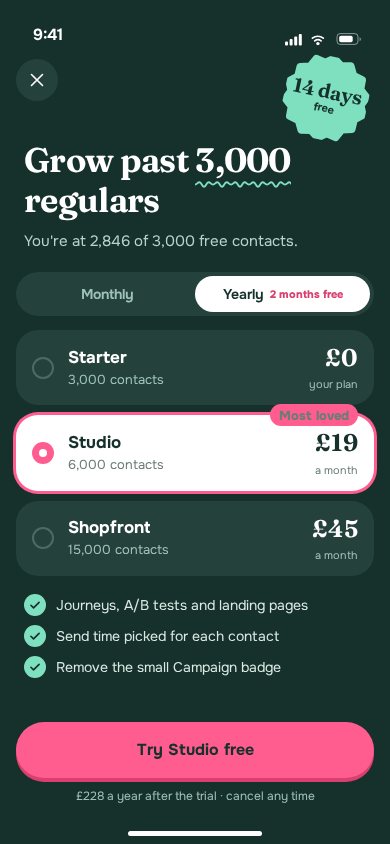
Campaign is a complete email marketing app for a small pottery studio: welcome, sign in and business setup, a home with this week's sends and audience growth, campaigns, a campaign checklist, new campaign, subject line and preview text with an inbox preview, a block email builder with an add block sheet, a phone preview, send test, schedule with a best time to send, review and a scheduled confirmation, a report with opens and clicks, a click map, audience with tags, a segment builder, a contact, an automation journey, a landing page, plans, notifications and settings. Pale sage and white with deep spruce, bubblegum pink, mint and lavender.
| Detail | Value |
|---|---|
| Screen type | Paywall |
| App | Campaign: Email marketing campaigns |
| Category | Productivity |
| Design language | Playful, light |
| Type | Fraunces for headings, Onest for text |
| Colours | #edf2ec background, #ffffff surface, #16302b text, #6a7d76 text-muted, #ff5d8f accent, #16302b accent-contrast, #23b98f secondary, #dce5de border, #e5484d danger |
What this screen says
- 14 daysfree
- Grow past 3,000 regulars
- You're at 2,846 of 3,000 free contacts.
- Monthly Yearly 2 months free
- Starter3,000 contacts
- £0your plan
- Most loved
- Studio6,000 contacts
- £19a month
- Shopfront15,000 contacts
- £45a month
- Journeys, A/B tests and landing pages
- Send time picked for each contact
- Remove the small Campaign badge
- Try Studio free
- £228 a year after the trial · cancel any time
Around it in Campaign
More paywall screens
- Layout Pro: Design anything from templates
- Tick Pro: To-do lists and reminders
- Beacon Plus: Find your devices and people
- Staffroom Health plan: HR, payslips and time off
- Slot Plans: Booking links and meeting scheduling
- Sheet Team: Spreadsheets and databases
- Tunnel Plans: VPN and online privacy
- Ping Plus: Internet speed test
- Glance Plus: Visual search with the camera
- Replay Pro: Record and share screen videos
- Easel Team: Collaborative whiteboard
- Token Plus: Two-factor codes and sign-in approvals
Every productivity app paywall screen
What makes a good paywall screen
- Lead with the outcome, not the feature list. The headline should say what changes for the person: "Train smarter every week" beats "Unlock Premium". Three to five benefits underneath are enough; more turns into a wall of ticks nobody reads.
- Show the real price, period and trial terms. State the price, how often it renews and when a free trial turns into a charge, near the button. Apple's App Store guideline 3.1.2 asks subscription apps to make this clear before purchase, and Google Play has similar rules.
- One primary button. The main call to action should be impossible to miss and say what happens: "Start 7-day free trial" or "Subscribe for $4.99/month". A second plan choice is fine; a second competing button is not.
- Make the plans easy to compare. When you offer monthly and yearly, show both prices in the same unit (per month or per week) and mark the saving on the yearly plan in plain numbers, not just a badge.
The full paywall screen guide and every example
Remix Campaign free: describe your own app and it is drawn in this design. Or get its files from $10: Figma, React Native, SwiftUI, Flutter and HTML.