Templates · Detail screens · Productivity app · Campaign
Campaign Landing page screen
A detail screen from Campaign, an email marketing campaigns app template in a Playful style. Screen 22 of 25.
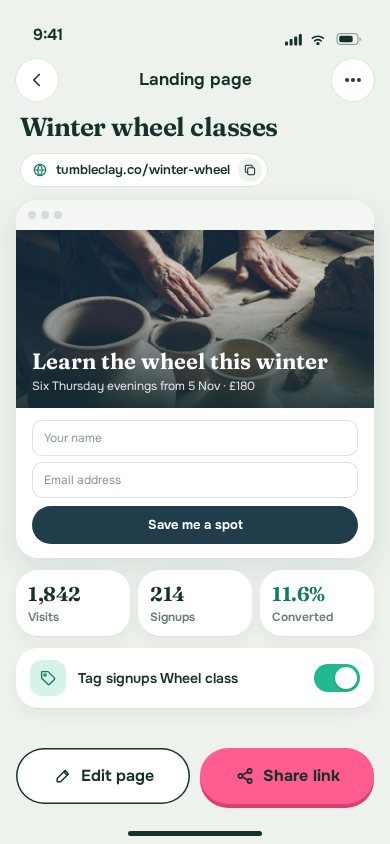
Campaign is a complete email marketing app for a small pottery studio: welcome, sign in and business setup, a home with this week's sends and audience growth, campaigns, a campaign checklist, new campaign, subject line and preview text with an inbox preview, a block email builder with an add block sheet, a phone preview, send test, schedule with a best time to send, review and a scheduled confirmation, a report with opens and clicks, a click map, audience with tags, a segment builder, a contact, an automation journey, a landing page, plans, notifications and settings. Pale sage and white with deep spruce, bubblegum pink, mint and lavender.
| Detail | Value |
|---|---|
| Screen type | Detail |
| App | Campaign: Email marketing campaigns |
| Category | Productivity |
| Design language | Playful, light |
| Type | Fraunces for headings, Onest for text |
| Colours | #edf2ec background, #ffffff surface, #16302b text, #6a7d76 text-muted, #ff5d8f accent, #16302b accent-contrast, #23b98f secondary, #dce5de border, #e5484d danger |
What this screen says
- Landing page
- Winter wheel classes
- tumbleclay.co/winter-wheel
- Learn the wheel this winterSix Thursday evenings from 5 Nov · £180
- Your name
- Email address
- Save me a spot
- 1,842Visits
- 214Signups
- 11.6%Converted
- Tag signups Wheel class
- Edit page
- Share link
Around it in Campaign
More detail screens
- Easel Retro template: Collaborative whiteboard
- Token Account: Two-factor codes and sign-in approvals
- Beam Transfer: Send big files
- Parchment Document: Documents, edit and share
- Lectern Deck: Slides and presenter remote
- Ringer Call details: Phone, contacts and voicemail
- Pipeline Deal: Sales CRM on the road
- Aim Objective: Goals and key results
- Scribe Note: Voice memos to notes
- Inkline Envelope: Sign and send contracts
- Dispatch Job: Field service jobs for technicians
- Stash Reader: Read-it-later and highlights
Every productivity app detail screen
What makes a good detail screen
- Lead with what identifies the item. A large image or title, the price or status, and the key facts at the top. People should know they are in the right place at a glance.
- Keep the main action visible. A sticky bottom button for Add to cart, Book or Play stays reachable while people scroll through details.
- Order information by importance. The facts that decide the choice come first; reviews, specifications and fine print further down.
- Use progressive disclosure. Long descriptions, specifications and policies can expand on tap rather than filling the screen.
The full detail screen guide and every example
Remix Campaign free: describe your own app and it is drawn in this design. Or get its files from $10: Figma, React Native, SwiftUI, Flutter and HTML.