Templates · Paywall screens · Productivity app · Glance
Glance Plus screen
A paywall screen from Glance, a visual search with the camera app template in a Glass style. Screen 23 of 25.
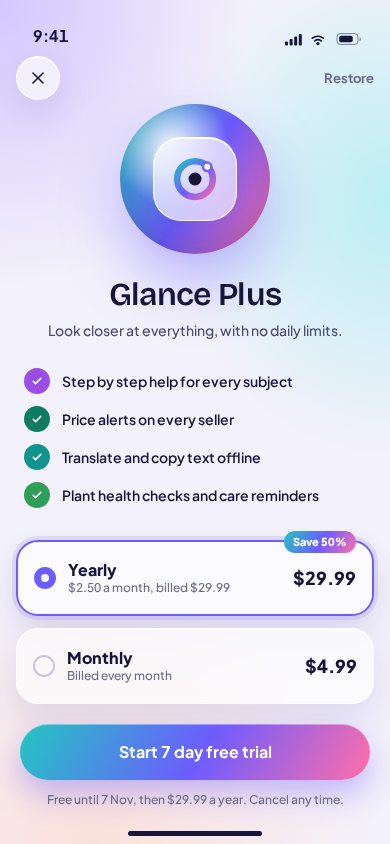
Glance is a complete visual search app: welcome, camera access and sign in, a home with recent glances and modes, a live camera with detected objects, a drag to select area, visual match results, shopping with prices, a product page with sellers, checkout and an order confirmation, a price alert, plant and landmark pages, copy text, live translate on a street sign, step by step homework help, history, collections and a moodboard, monthly insights, notifications, a Plus plan, profile and settings. Pearl and frosted glass with indigo ink and a prism gradient.
| Detail | Value |
|---|---|
| Screen type | Paywall |
| App | Glance: Visual search with the camera |
| Category | Productivity |
| Design language | Glass, light |
| Type | Bricolage Grotesque for headings, Plus Jakarta Sans for text |
| Colours | #f3f1fb background, #ffffff surface, #17153a text, #6c6a8a text-muted, #6d5cff accent, #ffffff accent-contrast, #22c7c0 secondary, #ff6fa8 highlight, #e6e3f3 border, #14a37f success |
What this screen says
- Restore
- Glance Plus
- Look closer at everything, with no daily limits.
- Step by step help for every subject
- Price alerts on every seller
- Translate and copy text offline
- Plant health checks and care reminders
- Yearly
- $2.50 a month, billed $29.99
- $29.99Save 50%
- Monthly
- Billed every month
- Start 7 day free trial
- Free until 7 Nov, then $29.99 a year. Cancel any time.
Around it in Glance
More paywall screens
- Shipyard Plans: Issue tracking for product teams
- Canvas Plans: Design files and comments on mobile
- Merge Pro: Code, pull requests and reviews
- Query Pro: AI answers with sources
- Glossa Pro: Translate text, voice and camera
- Layout Pro: Design anything from templates
- Tick Pro: To-do lists and reminders
- Beacon Plus: Find your devices and people
- Staffroom Health plan: HR, payslips and time off
- Slot Plans: Booking links and meeting scheduling
- Sheet Team: Spreadsheets and databases
- Tunnel Plans: VPN and online privacy
Every productivity app paywall screen
What makes a good paywall screen
- Lead with the outcome, not the feature list. The headline should say what changes for the person: "Train smarter every week" beats "Unlock Premium". Three to five benefits underneath are enough; more turns into a wall of ticks nobody reads.
- Show the real price, period and trial terms. State the price, how often it renews and when a free trial turns into a charge, near the button. Apple's App Store guideline 3.1.2 asks subscription apps to make this clear before purchase, and Google Play has similar rules.
- One primary button. The main call to action should be impossible to miss and say what happens: "Start 7-day free trial" or "Subscribe for $4.99/month". A second plan choice is fine; a second competing button is not.
- Make the plans easy to compare. When you offer monthly and yearly, show both prices in the same unit (per month or per week) and mark the saving on the yearly plan in plain numbers, not just a badge.
The full paywall screen guide and every example
Remix Glance free: describe your own app and it is drawn in this design. Or get its files from $10: Figma, React Native, SwiftUI, Flutter and HTML.