Templates · Detail screens · Productivity app · Scribe
Scribe Note screen
A detail screen from Scribe, a voice memos to notes app template in a Glass style. Screen 7 of 25.
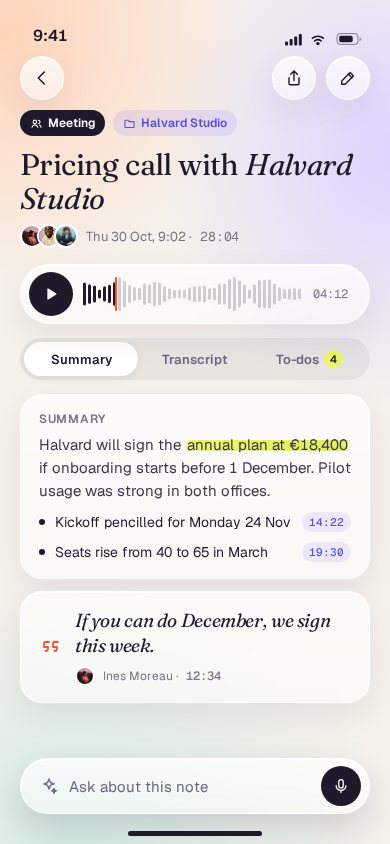
Scribe is a complete voice to notes app: welcome, setup and sign in, a home with the latest note and open to-dos, live recording with a running transcript, a transcribing tracker, a note with summary, key points and a pull quote, a karaoke style transcript player with speaker lanes, action items, library, search inside audio, folders, ask your notes, rewrite formats, sharing with a confirmation, saved highlights, audio import, monthly insights, notifications, a Pro plan with checkout and success, profile and settings. Warm pearl glass with aubergine ink, vermilion and a citron highlighter.
| Detail | Value |
|---|---|
| Screen type | Detail |
| App | Scribe: Voice memos to notes |
| Category | Productivity |
| Design language | Glass, light |
| Type | Fraunces for headings, Geist for text |
| Colours | #f6f1eb background, #ffffff surface, #1f1a2b text, #7a7287 text-muted, #ff4d2e accent, #ffffff accent-contrast, #8c7cf0 secondary, #e9f56a highlight, #ebe4dc border, #e8361d danger |
What this screen says
- Meeting Halvard Studio
- Pricing call with Halvard Studio
- Thu 30 Oct, 9:02 · 28:04
- Summary Transcript To-dos4
- Summary
- Halvard will sign the annual plan at €18,400 if onboarding starts before 1 December. Pilot usage was strong in both...
- Kickoff pencilled for Monday 24 Nov
- Seats rise from 40 to 65 in March
- If you can do December, we sign this week.
- Ines Moreau · 12:34
- Ask about this note
Around it in Scribe
More detail screens
- Stow File preview: Cloud storage
- Meridian Page: Mobile web browser
- Swarm Torrent: Torrent client
- Bench Portfolio item: Freelance marketplace
- Convene Meeting details: Video meetings
- Unplug Blocked: Screen time blocker
- Streak Habit: Small days, long chains
- Deskly Desk: Hybrid office booking
- Pomo Task: Focus timer
- Postbox Thread: Email for busy teams
- Daybook Event: Calendar and planner
- Scanly Document: Document scanner
Every productivity app detail screen
What makes a good detail screen
- Lead with what identifies the item. A large image or title, the price or status, and the key facts at the top. People should know they are in the right place at a glance.
- Keep the main action visible. A sticky bottom button for Add to cart, Book or Play stays reachable while people scroll through details.
- Order information by importance. The facts that decide the choice come first; reviews, specifications and fine print further down.
- Use progressive disclosure. Long descriptions, specifications and policies can expand on tap rather than filling the screen.
The full detail screen guide and every example
Remix Scribe free: describe your own app and it is drawn in this design. Or get its files from $10: Figma, React Native, SwiftUI, Flutter and HTML.