Templates · Detail screens · Productivity app · Dispatch
Dispatch Job screen
A detail screen from Dispatch, a field service jobs for technicians app template in an Enterprise style. Screen 6 of 25.
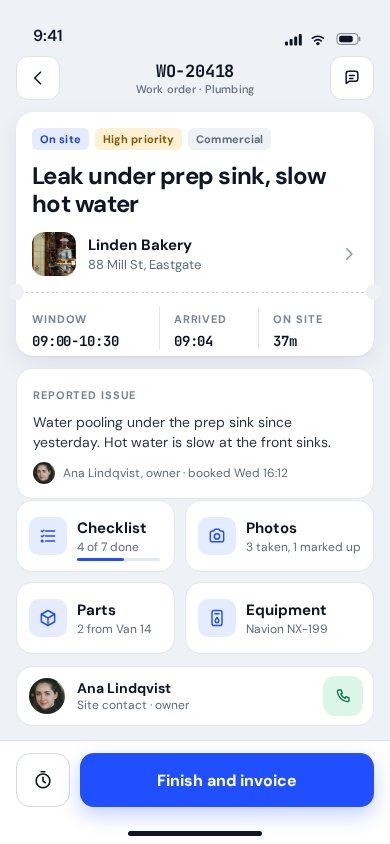
Dispatch is a complete field service app for technicians: welcome and company sign in, a today screen with the day's route spine, jobs, search, a work order ticket, the customer and their equipment, live navigation to the next stop, an on site job clock, a checklist, photo capture with markup, van stock, an invoice, customer sign off and a closed job. Then the week schedule, dispatch messages, performance, a timesheet, follow up jobs, notifications, a team plan, profile and settings. Cool grey, white tickets, deep ink and cobalt.
| Detail | Value |
|---|---|
| Screen type | Detail |
| App | Dispatch: Field service jobs for technicians |
| Category | Productivity |
| Design language | Enterprise, light |
| Type | DM Sans |
| Colours | #eef1f6 background, #ffffff surface, #0d1526 text, #5f6b7f text-muted, #1f4fff accent, #ffffff accent-contrast, #12a46b secondary, #dde2ea border, #e5484d danger |
What this screen says
- WO-20418 Work order · Plumbing
- On site High priority Commercial
- Leak under prep sink, slow hot water
- Linden Bakery
- 88 Mill St, Eastgate
- Window 09:00-10:30
- Arrived 09:04
- On site 37m
- Reported issue
- Water pooling under the prep sink since yesterday. Hot water is slow at the front sinks.
- Ana Lindqvist, owner · booked Wed 16:12
- Checklist
- 4 of 7 done
- Photos
- 3 taken, 1 marked up
- Parts
- 2 from Van 14
- Equipment
- Navion NX-199
- Ana Lindqvist
- Site contact · owner
- Finish and invoice
Around it in Dispatch
More detail screens
- Quill Doc: Docs, wikis and databases in one workspace
- Tandem Channel: Team chat, channels and huddles
- Shipyard Issue: Issue tracking for product teams
- Canvas File: Design files and comments on mobile
- Merge Repository: Code, pull requests and reviews
- Query Answer: AI answers with sources
- Glossa Translation: Translate text, voice and camera
- Layout Template: Design anything from templates
- Tick Task: To-do lists and reminders
- Beacon Person: Find your devices and people
- Staffroom Approval: HR, payslips and time off
- Slot Meeting: Booking links and meeting scheduling
Every productivity app detail screen
What makes a good detail screen
- Lead with what identifies the item. A large image or title, the price or status, and the key facts at the top. People should know they are in the right place at a glance.
- Keep the main action visible. A sticky bottom button for Add to cart, Book or Play stays reachable while people scroll through details.
- Order information by importance. The facts that decide the choice come first; reviews, specifications and fine print further down.
- Use progressive disclosure. Long descriptions, specifications and policies can expand on tap rather than filling the screen.
The full detail screen guide and every example
Remix Dispatch free: describe your own app and it is drawn in this design. Or get its files from $10: Figma, React Native, SwiftUI, Flutter and HTML.