Templates · Player, camera and editor screens · Lifestyle app · Brief
Brief Listen screen
A media screen from Brief, a news in sixty words app template in a Minimal style. Screen 16 of 25.
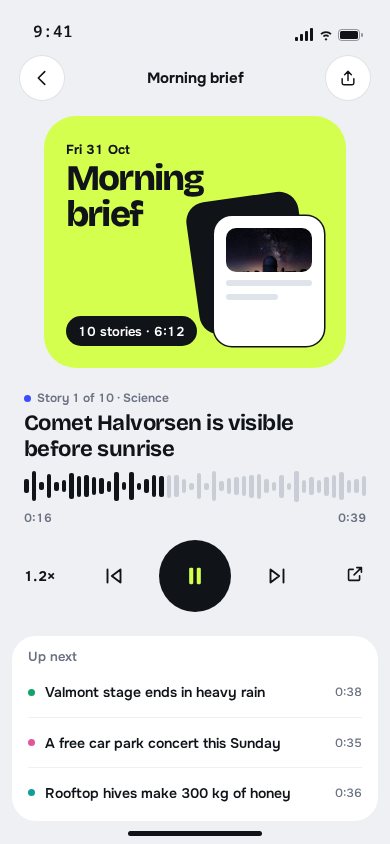
Brief is a complete short news app: welcome, topic picks, sign in and a code, a feed of full screen sixty word story cards stacked like a deck, the full story reader, a morning brief, discover with sections and trending topics, search, a section page, a trending topic timeline, a poll and its results, a weather card, a short video, an audio brief player, a weekly quiz with a score, a share card, saved stories, notifications, reading stats, a Plus plan, profile and settings. Cool grey and white with ink black, one lime highlight and a colour dot per section.
| Detail | Value |
|---|---|
| Screen type | Media |
| App | Brief: News in sixty words |
| Category | Lifestyle |
| Design language | Minimal, light |
| Type | Bricolage Grotesque for headings, Onest for text |
| Colours | #eef0f3 background, #ffffff surface, #101318 text, #6a7180 text-muted, #101318 accent, #ffffff accent-contrast, #d4ff4f secondary, #e3e6eb border, #ef4444 danger |
What this screen says
- Morning brief
- Fri 31 Oct
- Morning
- brief
- 10 stories · 6:12
- Story 1 of 10 · Science
- Comet Halvorsen is visible before sunrise
- Up next
- Valmont stage ends in heavy rain
- A free car park concert this Sunday
- Rooftop hives make 300 kg of honey
Around it in Brief
More player, camera and editor screens
- Trove Lens: Visual ideas and boards
- Vidi Watch: Video platform for creators
- Roll Photo: Photo library and backups
- Splice Record: Video editor for short clips
- Blush Try on: Beauty and makeup shopping
- Flatpack Room preview: Furniture store with room previews
- Column Listen: Newsletters and independent writers
- Fetch Photos: Dog walkers and pet sitters
- Forecourt Gallery: Buy and sell used cars
- Haul Spin: Bargain fashion and finds
- Muse Grid: AI image studio
- Admit Scanner: Events and tickets near you
Every lifestyle app media screen
What makes a good media player screen
- Content takes the space. Artwork, video or the camera view should fill most of the screen.
- Primary controls in the thumb zone. Play and pause, the shutter or the main tool, large and low on the screen.
- Show progress and position. A scrubber with elapsed and remaining time, or the step in a lesson.
- Hide secondary controls until needed. Lyrics, queue, filters and advanced tools can live behind a tap or a swipe.
The full media player screen guide and every example
Remix Brief free: describe your own app and it is drawn in this design. Or get its files from $10: Figma, React Native, SwiftUI, Flutter and HTML.