Templates · Player, camera and editor screens · Lifestyle app · Admit
Admit Scanner screen
A media screen from Admit, an events and tickets near you app template in a Playful style. Screen 25 of 25.
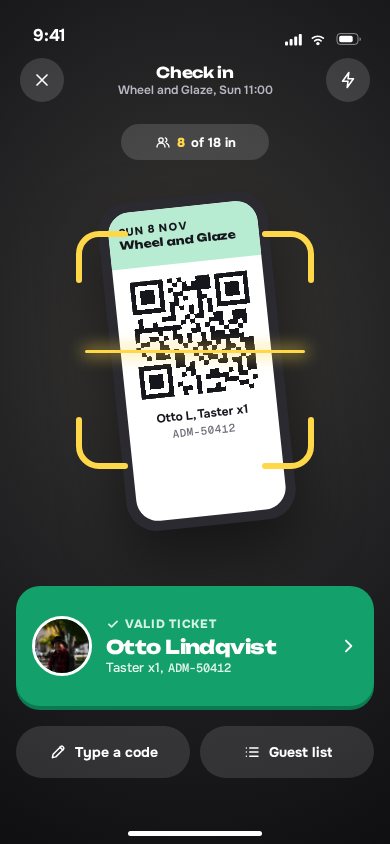
Admit is a complete local events app: welcome, interests and sign in, a discover home, search with categories, a weekend list by date, a map of what is on, event pages with the organiser, ticket tiers, checkout and a booked screen, a ticket wallet with QR codes and transfers, likes, followed organisers, notifications, a Plus plan, profile and settings, and a host mode with sales, a create event form, a guest list and a check in scanner. Oat and white with jade, sunflower and bubblegum.
| Detail | Value |
|---|---|
| Screen type | Media |
| App | Admit: Events and tickets near you |
| Category | Lifestyle |
| Design language | Playful, light |
| Type | Unbounded for headings, Onest for text |
| Colours | #f6f3ec background, #ffffff surface, #16161d text, #6e6b78 text-muted, #14a06a accent, #ffffff accent-contrast, #ffd84a secondary, #ff8fb8 tertiary, #e8e3d8 border, #f0533e danger |
What this screen says
- Check inWheel and Glaze, Sun 11:00
- 8 of 18 in
- SUN 8 NOVWheel and Glaze
- Otto L, Taster x1
- ADM-50412
- VALID TICKETOtto Lindqvist
- Taster x1, ADM-50412
- Type a code
- Guest list
Around it in Admit
More player, camera and editor screens
- Kibble Vet chat: Pet supplies and autoship
- Filmlog Trailer: Film diary and reviews
- Postage Scan: Send parcels and find drop-off points
- Specs Try on: Glasses with virtual try-on
- Dorm Virtual tour: Find student housing
- Hem Fit photo: Tailoring and alterations, collected
- Stub Ticket: Fan to fan ticket resale
- Trove Lens: Visual ideas and boards
- Vidi Watch: Video platform for creators
- Roll Photo: Photo library and backups
- Splice Record: Video editor for short clips
- Blush Try on: Beauty and makeup shopping
Every lifestyle app media screen
What makes a good media player screen
- Content takes the space. Artwork, video or the camera view should fill most of the screen.
- Primary controls in the thumb zone. Play and pause, the shutter or the main tool, large and low on the screen.
- Show progress and position. A scrubber with elapsed and remaining time, or the step in a lesson.
- Hide secondary controls until needed. Lyrics, queue, filters and advanced tools can live behind a tap or a swipe.
The full media player screen guide and every example
Remix Admit free: describe your own app and it is drawn in this design. Or get its files from $10: Figma, React Native, SwiftUI, Flutter and HTML.