Templates · List and feed screens · Social app · Blink
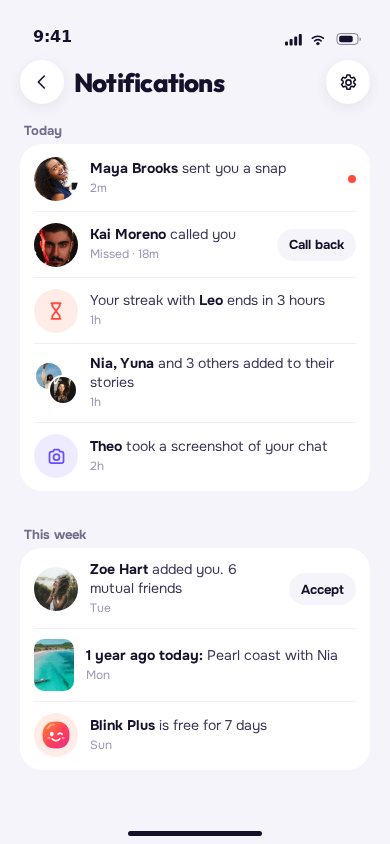
Blink Notifications screen
A list screen from Blink, a camera chat and stories app template in a Gen Z style. Screen 22 of 25.
Blink is a complete camera chat app: welcome, username, log in and a code, a camera home with lenses and a flame shutter, a lens explorer, a snap editor with stickers and captions, send to friends and a sent screen, chats with diamond status pips and streaks, a disappearing conversation, a full screen snap, a video call, stories and a story viewer, a live friend map, a friend profile, streak stats, memories, add friends, a new group, notifications, Blink Plus, profile and settings. Lilac milk and white with a tangerine to watermelon flame, ultraviolet and mint.
| Detail | Value |
|---|---|
| Screen type | List |
| App | Blink: Camera chat and stories |
| Category | Social |
| Design language | Gen Z, light |
| Type | Outfit for headings, Onest for text |
| Colours | #f6f4fb background, #ffffff surface, #16112b text, #736d8c text-muted, #ff4a3d accent, #ffffff accent-contrast, #6a4dff secondary, #e8e4f2 border, #e5243b danger |
What this screen says
- Notifications
- Today
- Maya Brooks sent you a snap2m
- Kai Moreno called youMissed · 18m
- Call back
- Your streak with Leo ends in 3 hours1h
- Nia, Yuna and 3 others added to their stories1h
- Theo took a screenshot of your chat2h
- This week
- Zoe Hart added you. 6 mutual friendsTue
- Accept
- 1 year ago today: Pearl coast with NiaMon
- Blink Plus is free for 7 daysSun
Around it in Blink
More list and feed screens
- Linkup Skills: Professional network and jobs
- Quorum Comments: Questions and expert answers
- Backer Community: Support creators with memberships
- Pledge Rewards: Back creative projects
- Civic My requests: Report issues and city services
- Guild Messages: Community servers with voice and text chat
- Parrot Calls: Private messaging, groups and calls
- Carrier Channels: Cloud messaging with channels
- Vista Comments: Photos, stories and reels
- Flick Following: Short video feed
- Squawk Topic: Short posts and live conversation
- Agora Comments: Communities, threads and votes
What makes a good list screen
- Show what people need to decide. Each row should carry just enough to choose: a title, one or two details and a status. Everything else belongs on the detail screen.
- Keep rows consistent. The same information in the same place on every row lets people scan down a column instead of reading each item.
- Group with headings. Dates, categories or status headings break long lists into chunks people can skip through.
- Make common actions quick. Swipe actions, a checkbox or a heart on the row save opening the item for small tasks.
The full list screen guide and every example
Remix Blink free: describe your own app and it is drawn in this design. Or get its files from $10: Figma, React Native, SwiftUI, Flutter and HTML.