Templates · Sign in and sign up screens · Music app · Belt
Belt Sign in screen
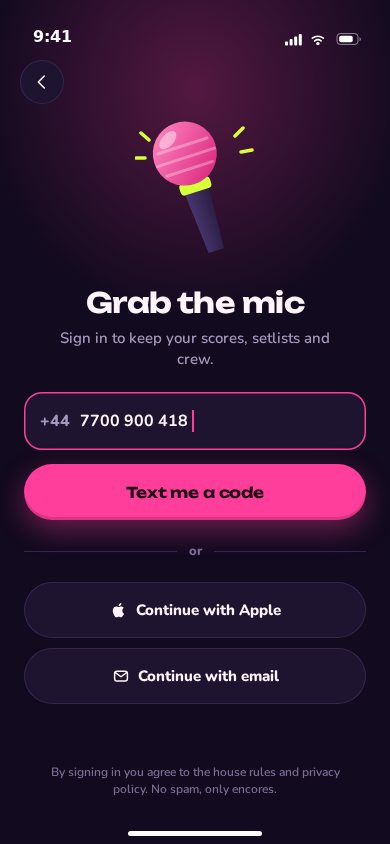
A sign in screen from Belt, a karaoke nights app template in a Gen Z style. Screen 3 of 25.
Belt is a complete karaoke nights app: welcome, your voice and sign in, a home with tonight's nights and the queue, a song library with search, song pages with key and difficulty, nights and venue pages, booking a private room with a split checkout and a booked pass, the live queue, requesting a song with a key shift and a duet partner, a now singing screen with wiping lyrics and a pitch ribbon, your score, clips and a clip player, setlists, your crew, a leaderboard, vocal stats, notifications, Belt Plus, profile and settings. Grape black, bubblegum pink and acid lime.
| Detail | Value |
|---|---|
| Screen type | Sign in |
| App | Belt: Karaoke nights |
| Category | Music |
| Design language | Gen Z, dark |
| Type | Unbounded for headings, Nunito for text |
| Colours | #120a1f background, #1e1430 surface, #fff4fa text, #a597bd text-muted, #ff3d9a accent, #1c0614 accent-contrast, #d7ff3a secondary, #33264d border, #ff6150 danger |
What this screen says
- Grab the mic
- Sign in to keep your scores, setlists and crew.
- Text me a code
- or
- Continue with Apple
- Continue with email
- By signing in you agree to the house rules and privacy policy. No spam, only encores.
Around it in Belt
More sign in and sign up screens
- Gigly Sign in: Gig and festival tickets
- Padd Sign in: Beat maker
- Aria Sign in: Audiobook library
- Hum Sign in: Song recognition
- Riff Sign up: Upload and discover new tracks
- Groove Sign in: Vinyl collection and crate digging
- Crossfade Sign in: DJ mixing on the go
- Fork Sign in: Tuner and metronome
- Crowd Sign in: Concert diary and setlists
- Dial Sign in: Internet radio from everywhere
- Chorus Sign up: Singing lessons and pitch training
- Verse Sign in: Songwriting notebook
Every music app sign in screen
What makes a good login screen
- Offer the fastest option first. Sign in with Apple, Google or a passkey takes one tap. If you support them, put them above the email form. Apple asks apps that use a third-party login like Google to also offer an equivalent privacy-focused option, such as Sign in with Apple.
- Separate sign in from sign up clearly. Use different headings and buttons, and a clear link to switch. People who already have an account should never end up creating a second one by accident.
- Use the right keyboard and autofill. Email fields should open the email keyboard and support password managers and one-time code autofill. Small details, big difference in how many people get through.
- Write errors that help. "That password doesn't match this email" is better than "Error 401". Keep what people typed so they only fix the part that was wrong.
The full login screen guide and every example
Remix Belt free: describe your own app and it is drawn in this design. Or get its files from $10: Figma, React Native, SwiftUI, Flutter and HTML.