Templates · Home screens · Music app · Belt
Belt Home screen
A home screen from Belt, a karaoke nights app template in a Gen Z style. Screen 4 of 25.
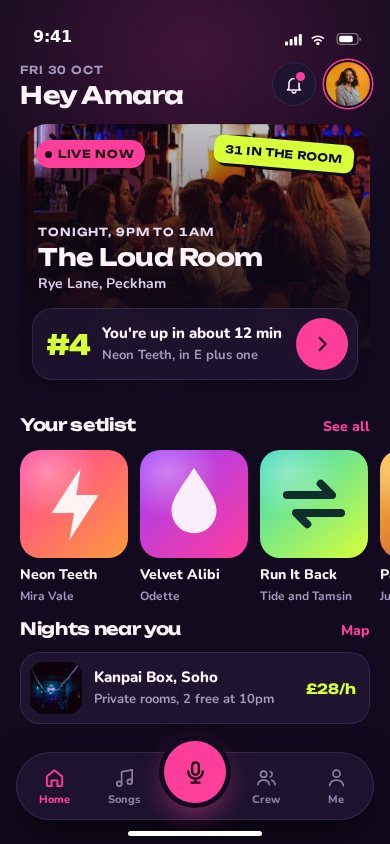
Belt is a complete karaoke nights app: welcome, your voice and sign in, a home with tonight's nights and the queue, a song library with search, song pages with key and difficulty, nights and venue pages, booking a private room with a split checkout and a booked pass, the live queue, requesting a song with a key shift and a duet partner, a now singing screen with wiping lyrics and a pitch ribbon, your score, clips and a clip player, setlists, your crew, a leaderboard, vocal stats, notifications, Belt Plus, profile and settings. Grape black, bubblegum pink and acid lime.
| Detail | Value |
|---|---|
| Screen type | Home |
| App | Belt: Karaoke nights |
| Category | Music |
| Design language | Gen Z, dark |
| Type | Unbounded for headings, Nunito for text |
| Colours | #120a1f background, #1e1430 surface, #fff4fa text, #a597bd text-muted, #ff3d9a accent, #1c0614 accent-contrast, #d7ff3a secondary, #33264d border, #ff6150 danger |
What this screen says
- Fri 30 Oct
- Hey Amara
- Live now
- 31 in the room
- Tonight, 9pm to 1am
- The Loud Room
- Rye Lane, Peckham
- #4
- You're up in about 12 minNeon Teeth, in E plus one
- Your setlist
- See all
- Neon TeethMira Vale
- Velvet AlibiOdette
- Run It BackTide and Tamsin
- Paper Moon MotelJuniper Ash
- Nights near you
- Map
- Kanpai Box, SohoPrivate rooms, 2 free at 10pm
- £28/h
- Home
- Songs
- Crew
- Me
Around it in Belt
More home screens
- Riff Home: Upload and discover new tracks
- Groove Home: Vinyl collection and crate digging
- Crossfade Home: DJ mixing on the go
- Fork Home: Tuner and metronome
- Crowd Home: Concert diary and setlists
- Dial Home: Internet radio from everywhere
- Chorus Home: Singing lessons and pitch training
- Verse Notebook: Songwriting notebook
- Masters Home: Royalties and streams for artists
- Sonata Home: Concert hall season and tickets
- Quire Home: Sheet music and practice
- Wax Home: Music streaming
What makes a good home screen
- Put the most important thing first. Decide the one thing most people come for, like today's workout, a balance or the next booking, and give it the top of the screen.
- Make it feel current. Greetings with the time of day, today's date, fresh numbers and recent activity tell people the app is alive and about them.
- Keep quick actions within thumb reach. The two or three things people do most should be one tap away, in the lower part of the screen or a floating button.
- Group related content in clear sections. Use headings and spacing so the screen scans as a few blocks, not a long mixed list.
The full home screen guide and every example
Remix Belt free: describe your own app and it is drawn in this design. Or get its files from $10: Figma, React Native, SwiftUI, Flutter and HTML.