Templates · Sign in and sign up screens · Music app · Gigly
Gigly Sign in screen
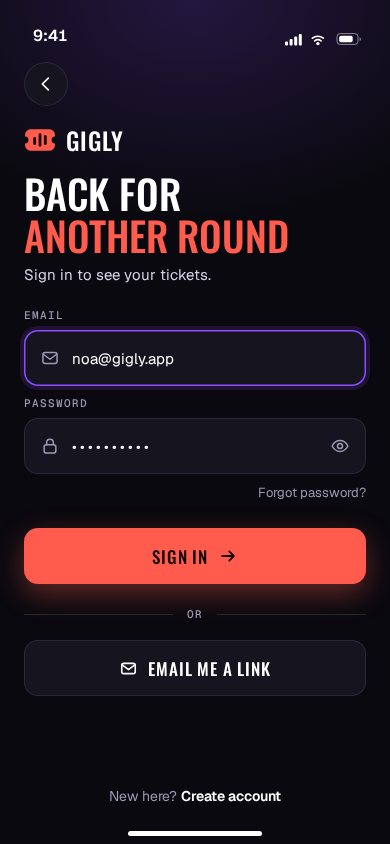
A sign in screen from Gigly, a gig and festival tickets app template in a Gen Z style. Screen 2 of 25.
Gigly is a complete ticketing app for live music: welcome, sign in, a code and picking your sound, a home of gigs near you, search and filters, a gig page, a festival lineup with set times, artist and venue pages, a seat map, checkout, payment and a booked screen, a ticket wallet, a paper ticket with a QR code, sending a ticket, the crew of friends going, yearly gig stats, notifications, a Plus plan, profile and settings. Every gig is a drawn poster and every ticket is a notched stub.
| Detail | Value |
|---|---|
| Screen type | Sign in |
| App | Gigly: Gig and festival tickets |
| Category | Music |
| Design language | Gen Z, dark |
| Type | Geist |
| Colours | #0a090f background, #16141f surface, #ffffff text, #9d98b3 text-muted, #ff5c4d accent, #14060a accent-contrast, #8b4dff secondary, #2a2739 border, #ff3d71 danger |
What this screen says
- Gigly
- Back for
- another round
- Sign in to see your tickets.
- noa@gigly.app
- Password
- ••••••••••
- Forgot password?
- Sign in
- or
- Email me a link
- New here? Create account
Around it in Gigly
More sign in and sign up screens
- Sonata Sign in: Concert hall season and tickets
- Quire Sign in: Sheet music and practice
- Wax Sign in: Music streaming
- Earshot Sign in: Podcast player
- Strum Sign in: Learn guitar, one chord at a time
- Padd Sign in: Beat maker
- Aria Sign in: Audiobook library
- Hum Sign in: Song recognition
- Riff Sign up: Upload and discover new tracks
- Groove Sign in: Vinyl collection and crate digging
- Crossfade Sign in: DJ mixing on the go
- Fork Sign in: Tuner and metronome
Every music app sign in screen
What makes a good login screen
- Offer the fastest option first. Sign in with Apple, Google or a passkey takes one tap. If you support them, put them above the email form. Apple asks apps that use a third-party login like Google to also offer an equivalent privacy-focused option, such as Sign in with Apple.
- Separate sign in from sign up clearly. Use different headings and buttons, and a clear link to switch. People who already have an account should never end up creating a second one by accident.
- Use the right keyboard and autofill. Email fields should open the email keyboard and support password managers and one-time code autofill. Small details, big difference in how many people get through.
- Write errors that help. "That password doesn't match this email" is better than "Error 401". Keep what people typed so they only fix the part that was wrong.
The full login screen guide and every example
Remix Gigly free: describe your own app and it is drawn in this design. Or get its files from $10: Figma, React Native, SwiftUI, Flutter and HTML.